Просмотр новости
Найдите то, что Вас интересует
 Спутники
 РН
 SpaceX
 Роскосмос
 NASA
СпутникиРНSpaceXРоскосмосNASAiOS 27 introduces a new device recovery mode. This is a Mac-like recovery feature where the iPhone is able to boot into an alternative UI that doesn’t involve loading the entirety of the main operating system.
In the new recovery mode, you can use restore your software, enter diagnostics mode, erase the device, and perform some automated fixes using Recovery Assistant.
more…
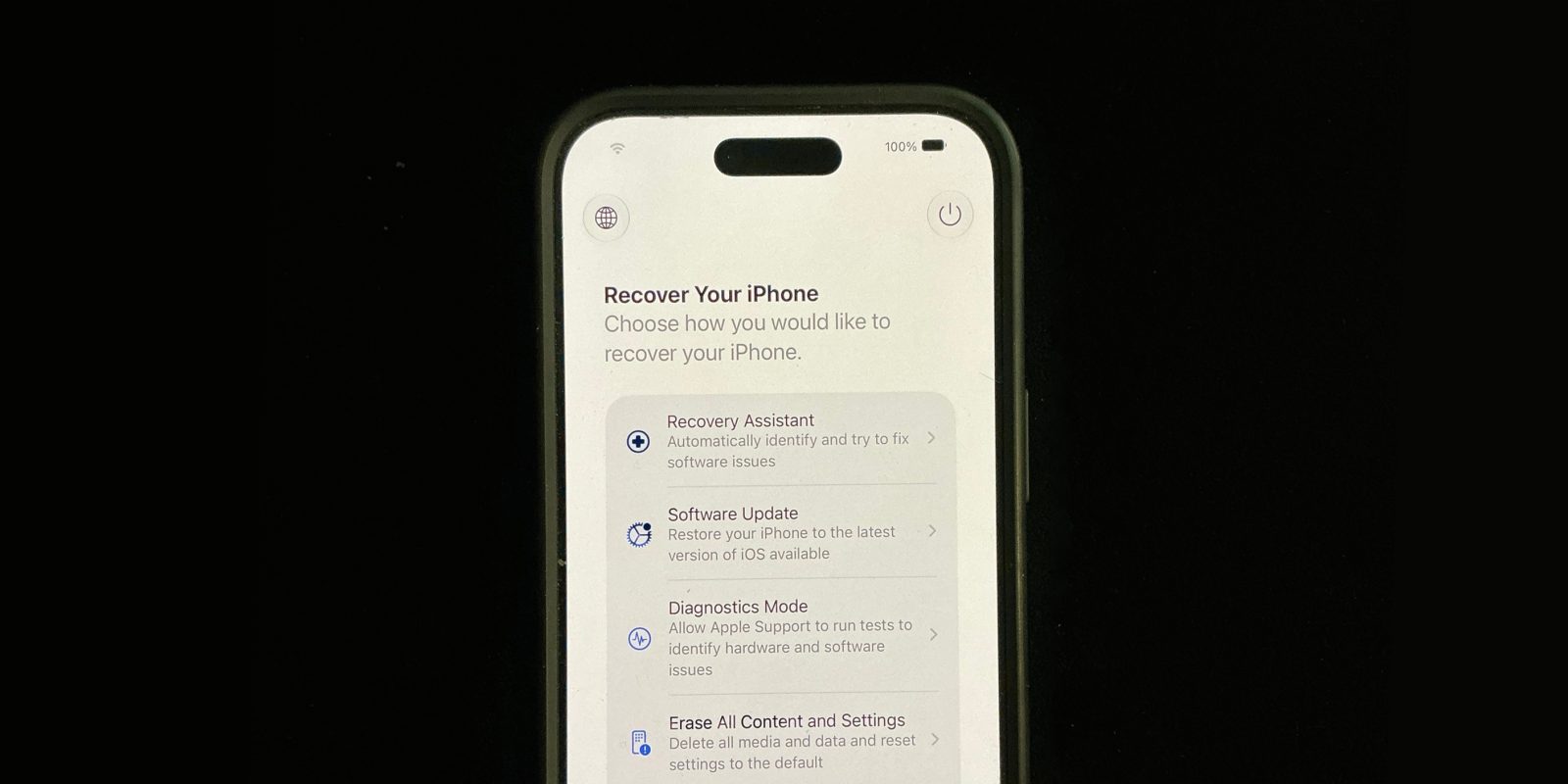
iOS 27 introduces a new device recovery mode. This is a Mac-like recovery feature where the iPhone is able to boot into an alternative UI that doesn’t involve loading the entirety of the main operating system.
In the new recovery mode, you can use restore your software, enter diagnostics mode, erase the device, and perform some automated fixes using Recovery Assistant.
This feature is available in both iOS 27 and iPadOS 27, for iPhone and iPad.
How to enter recovery mode on iOS 27The procedure is similar to how you enter recovery mode on Apple Silicon Macs, where you simply hold down the Touch ID power button.
The options available in the new iOS recovery screen include ‘Recovery Assistant’, ‘Software Update’, ‘Diagnostics Mode’, ‘Erase All Content and Settings’, and ‘Recovery Mode’.
Additionally, the current battery percentage is shown in the top corner of the screen, and the phone will connect to your known WiFi network automatically. A power button in the toolbar gives you the option to let the phone attempt to restart normally.
The new recovery options should mean that some last-resort fixes that previously required connecting to a computer, can now instead be done independently on the iOS device itself.
Obviously, it is quite rare for such recovery to be necessary. It can occasionally happen when a software update fails to install, like if the phone suddenly runs out of battery while an update is in progress.
Some iOS beta versions in the past have also caused device to soft-lock and enter boot loops; if that happens in the future, you may be able to use the Software Update recovery assistant to reinstall the last-known stable OS version, without needing to enter DFU mode and restore using a computer.


FTC: We use income earning auto affiliate links. More.

| # | Наименование новости | Тональность | Информативность | Дата публикации |
|---|---|---|---|---|
| 1 | How to enter recovery restore screen on iPhone in iOS 27 | 0 | 20.02 | 13-07-2026 |
| 2 | This iOS 27 bug temporarily freezes your iPhone … and it’s going viral on social media | 0 | 10.27 | 16-09-2026 |
| 3 | Install iOS 27 today — there’s no reason to wait | 0 | 22.63 | 12-09-2026 |
| 4 | iOS 27 arrives with a smarter Siri and fixes you’ll actually notice | 0 | 24.28 | 14-09-2026 |
| 5 | iOS 27, iPadOS 27, watchOS 27 and macOS Golden Gate release time [Updated] | 0 | 29.28 | 12-09-2026 |
| 6 | The new dictation feature is off-by-default in iOS 27 beta 1, here’s how to turn it on | 0 | 18.29 | 12-06-2026 |
| 7 | Regret installing iOS 27 beta? Here’s how to get back to iOS 26. | 0 | 24.41 | 10-07-2026 |
| 8 | Apple Added A New Scam Prevention Feature With iOS 27 | 0 | 21.68 | 18-09-2026 |
| 9 | Here’s when Apple will launch iOS 27.2 | 0 | 29.05 | 20-10-2026 |
| 10 | The new iPhones have a problem turning back on after the battery runs out | 0 | 10.82 | 26-04-2026 |