Просмотр новости
Найдите то, что Вас интересует
 Спутники
 РН
 SpaceX
 Роскосмос
 NASA
СпутникиРНSpaceXРоскосмосNASAUpdate: This bug appears to be fixed on iOS 27.2 beta 2.
Just a matter of days after iOS 27 has been released to the public, people have already discovered a way to temporarily brick your phone with a quick series of swipes on the home screen. And it’s starting to going viral on social media as some kind of iPhone prank to do on your friends.
Luckily, it is only a software soft-lock and you can easily get out of this temporarily bricked state by force rebooting your phone. Here’s how …
more…
Update: This bug appears to be fixed on iOS 27.2 beta 2.
Just a matter of days after iOS 27 has been released to the public, people have already discovered a way to temporarily brick your phone with a quick series of swipes on the home screen. And it’s starting to going viral on social media as some kind of iPhone prank to do on your friends.
Luckily, it is only a software soft-lock and you can easily get out of this temporarily bricked state by force rebooting your phone. Here’s how …
These kind of soft-locks have existed in various iOS versions in the past, and Apple usually gets round to fixing them eventually. Sometimes, they have necessitated complex sequence of taps and gestures to trigger the bug. In this case, it’s pretty trivial to get into the busted state.
On a phone running iOS 27, go to the Home Screen, then pull down from the top-left corner as if you were opening Notification Center. Almost immediately after, way before the Notification Center has finished sliding down, pull down from the right-hand corner to open Control Center. Then, dismiss Control Center and you can see if your phone has entered the borked state.
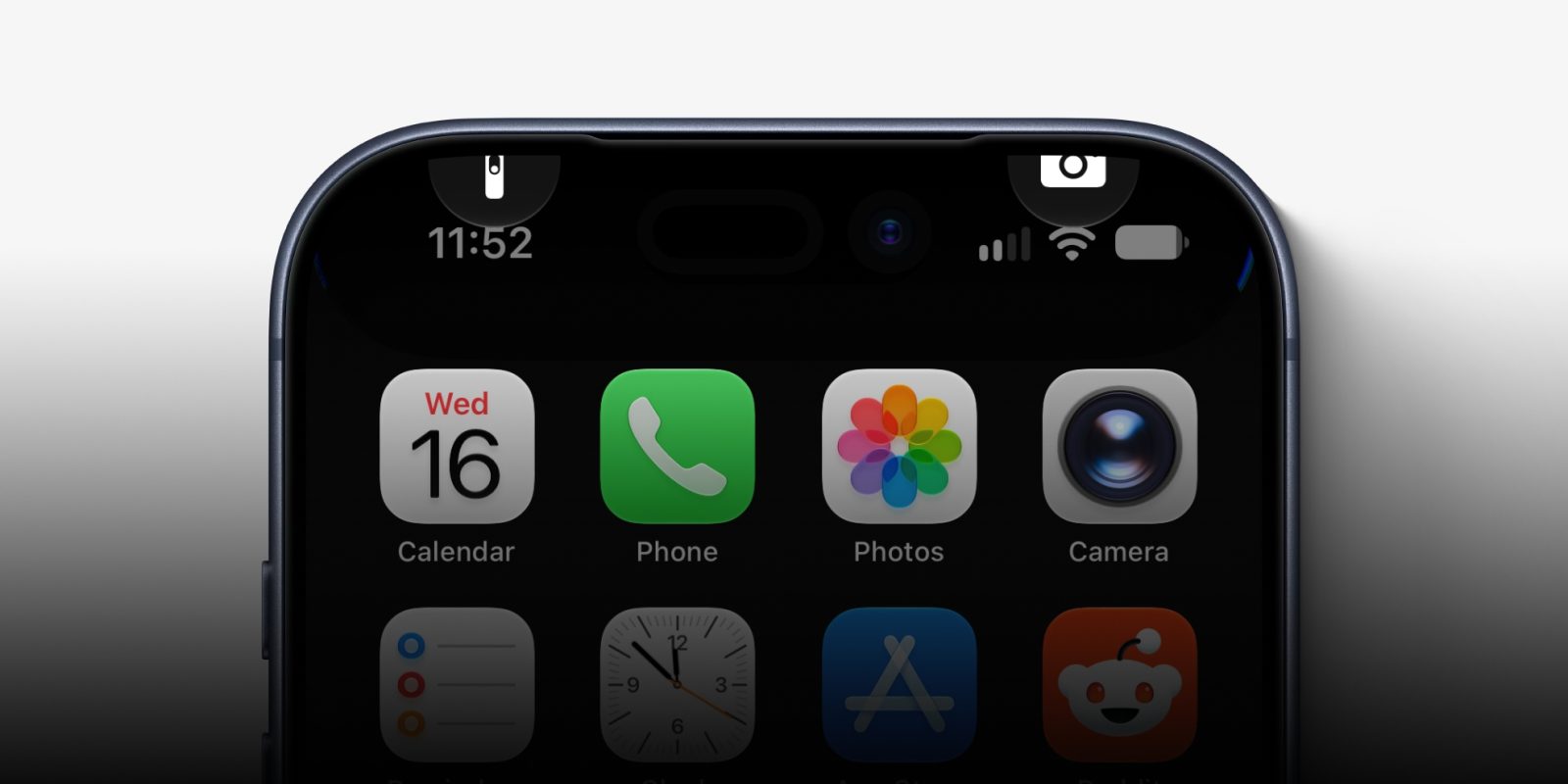
Usually, when this happens the lock screen buttons for Camera and Torch get stuck at the top of the screen. But the big-tell tale sign is you can no longer swipe between home screens, and if you open apps, taps don’t reliably register on UI elements so you can’t really navigate around the phone anymore.
If you try and hold the side button to get to the slide to power off screen, the slider doesn’t respond to your swipe gesture.
Luckily, this is all completely harmless and the solution to get out the bricked state is to force-reboot the phone. That causes the phone to shut down and restart:
To force reboot a modern iPhone, press the volume up button once, press the volume down button once, then hold the side button down until the Apple logo appears. Your phone will then reboot and be back to normal.
If you try and reproduce this glitch, and you can’t get it to work for you, you might need to repeat the swipes a couple times. It’s not hard to do, but there’s only small window of time where it works. I can reliably reproduce it within about two or three attempts on my iPhone Air running iOS 27.0, and it still happens on the just-released iOS 27.2 beta as well.
Here’s a screen recording of me reproducing the bug; swipe from top-left, then quickly swipe from top-right:


FTC: We use income earning auto affiliate links. More.

| # | Наименование новости | Тональность | Информативность | Дата публикации |
|---|---|---|---|---|
| 1 | PSA: This iOS 27 Bug Can Freeze Your iPhone | 0 | 23.16 | 17-09-2026 |
| 2 | iOS 27: Your iPhone can now boot into a new Mac-like recovery mode | 0 | 14.59 | 11-06-2026 |
| 3 | Watch out for this nasty iOS 27 freeze bug — here’s the fix | 0 | 21.33 | 17-09-2026 |
| 4 | Новый баг в iOS 27 временно превращает iPhone в кирпич | 0 | 11.6 | 17-09-2026 |
| 5 | Apple releases fourth iOS 27.2 developer beta for iPhone [U: Public] | 0 | 19.65 | 13-10-2026 |
| 6 | В iOS 27 нашли баг, из-за которого интерфейс iPhone «ломается» — вот как всё исправить | 0 | 36.06 | 17-09-2026 |
| 7 | Apple releases first iOS 27.2 developer beta for iPhone | 0 | 20.73 | 16-09-2026 |
| 8 | Apple releases second iOS 27.2 developer beta for iPhone | 0 | 21.7 | 21-09-2026 |
| 9 | Battery draining faster after updating to iOS 27? Don’t panic … | 0 | 15.36 | 15-09-2026 |
| 10 | Apple всех обманула. Оптимизированная iOS 27 ломает iPhone в пару касаний | 0 | 10.15 | 17-09-2026 |