Просмотр новости
Найдите то, что Вас интересует
 Спутники
 РН
РН SpaceX
 Роскосмос
 NASA
NASA
СпутникиРНSpaceXРоскосмосNASAMacworld
At a glanceExpert's Rating
Pros
Affordable QD-OLED panel
120Hz refresh rate
HDR
Adjustable Height/Tilt/Swivel stand
Cons
Text not as sharp as 5K
No webcam
Our Verdict
120Hz OLED, proper HDR, professional color, extensive connectivity and a genuinely adjustable stand make the ASUS ProArt OLED PA279CDV hard to ignore—particularly for creative professionals.
Price When Reviewed
This value will show the geolocated pricing text for product undefined
Best Pricing Today
Best Prices Today: ASUS ProArt Display OLED PA279CDV
Retailer
Price
Check
Price comparison from over 24,000 stores worldwide
What is it? A color-accurate 4K display with a highly adjustable stand that makes the Apple Studio Display look rather expensive.
Who is it for? Professional photo and video creators, plus gamers.
Who shouldn’t buy it? People for whom only the very sharpest text will do.
Buy the Asus if you want OLED, 120Hz, HDR, far more ports, adjustable stand, much lower price.
Buy Apple’s Studio Display if you want: Sharper 5K text, better speakers, built-in webcam, stronger Mac integration.
Apple recently updated its Studio Display, and our reviewer wasn’t overly impressed with the barely new model, especially at such a high price. It’s still one of the best monitors you can buy for a Mac, but ASUS may now have made the better monitor—at a much more realistic price point.
That might sound like heresy when the two 27-inch displays are sitting side by side on the same desk. The 2026 Apple Studio Display is quintessentially Apple: beautifully integrated, razor-sharp, packed with decent speakers and a great camera for video calls. The ASUS ProArt Display OLED PA279CDV is less elegant (its plastic shell and bezels are no match for the Studio Display’s aluminum and full-face front glass panel), with basic speakers and no webcam, but technically more ambitious—and in several crucial ways, it is considerably more capable.
The ASUS ProArt is happy in Portrait as well as Landscape orientation. If you want a more vertical view of the Studio Display Apple will make you swap the stand for a VESA mount adapter.Simon Jary
Is 4K sharp enough compared with the Studio Display’s 5K?
Apple wins for text sharpness.
ASUS wins for motion, contrast, HDR and creative/video work.
Apple’s biggest weapon in the fight is its 5K Retina advantage. The Studio Display packs 5120 x 2880 pixels, giving it a wonderful 218ppi pixel density, ensuring that text is exceptionally crisp and the interfaces look beautifully rendered.
The ASUS is 4K, at 3840 x 2160, and 166ppi. That’s still sharp, but put the two displays side by side and the difference is clear, particularly with text—important for writers, developers and anyone who spends eight hours staring at browser windows, documents and menus, and those with the extra cash in their pocket.
If your workload is primarily Safari/Mail/Word/Excel/coding/lots of text, the Apple Studio Display has a meaningful advantage, but then we’d recommend you look at more affordable 5K displays such as the $999/£899 BenQ MA270S or BenQ PD2730S or budget $699 KTC 5K2K Monitor. Don’t get me wrong, the text on the PA279CDV is great—just not 5K great.
Read our reviews for more of the best monitors for Mac.
The ProArt’s secret weapon is sitting behind all those pixels: its QD-OLED panel gives the ASUS a huge advantage in contrast, with deep blacks, virtually instantaneous response times and much more convincing HDR. Its 120Hz refresh rate also makes scrolling, animations and timeline scrubbing noticeably smoother than the Apple’s 60Hz panel. If you’ve become accustomed to the 120Hz ProMotion display on a MacBook Pro, the Studio Display’s 60Hz refresh rate can feel like a step backwards. The ASUS doesn’t make that compromise. For photography and especially HDR video work, the PA279CDV is the display I’d want in front of me.
Color performance is strong on both. ASUS targets professional creators with factory calibration, a Delta E (ΔE) below 1.5 and broad DCI-P3 coverage, while Apple offers a range of color and reference modes. For HDR video and visually demanding creative work, though, the ASUS’s OLED panel is the more compelling choice.
The ProArt’s studio-grade 99% DCI-P3 gamut ensures rich, vivid colors, making it ideal for color-intensive projects. The peak brightness of 1000 nits allows for outstanding contrast between its deeper blacks and brighter whites.
HDR and 120Hz refresh rate don’t go together on every resolution option, for example 2560 x 1440 pixels.Simon Jary
Is the ASUS better for color, HDR and creative work?
Screen: 27-inch OLED
Finish: Gloss (anti-scratch)
Max resolution: 3840 x 2160 pixels
Refresh rate: 120Hz
DCI-P3 color coverage: 99%
sRGB color coverage: 100%
Contrast Ratio: True Black
Delta E (dE): <1.5
Brightness: 1,000 nits (peak)
OLED is the display technology for anyone who values image quality above all else. Its self-lit pixels deliver perfect blacks, exceptional contrast and near-instant response times, making HDR content, photos, video and games look spectacular. For creators and entertainment fans, OLED offers a richer, more immersive visual experience than IPS. If you spend most of your time on general productivity work, spend hours reading text, or work in brightly lit rooms, an IPS panel (and 5K if you can afford it) might make more sense.
ASUS employs OLED Care features to safeguard the display against image burn-in which can be a problem with OLED screens. This dynamically detects and identifies the task bar, logos, and video edges, reducing the brightness around them to minimise the risk of burn-in.
The peak brightness isn’t as stunning as on the Apple Studio Display XDR, but that costs around $3,000 compared to $699 for the ASUS.
Cable management on the multi-adjustable stand is basic but appreciated. Simon Jary
How adjustable is the ASUS ProArt stand?
Where Apple charges you an extra $400/£400 for its tilt and height-adjustable stand, this comes as standard with the ASUS ProArt, which offers tilt, swivel, 90° pivot, and 5-inch height adjustments for a more comfortable viewing experience. The small-footprint stand (shown above) also features basic built-in cable management, where cables can be passed neatly through an opening that should lead to a more organised workspace. To be fair to Apple, the Studio Display’s stand features the same, but some monitor stands don’t bother with this cable-clutter remover.
The monitor also tackles clutter by having a built-in power supply, so there’s no power brick sitting under your desk.
Does the ASUS have better connectivity than the Studio Display?
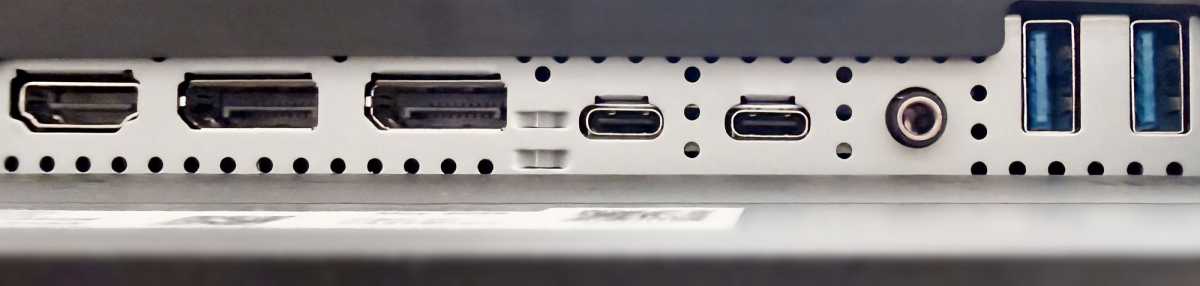
Where Apple sticks rigidly to its Thunderbolt/USB-C connectors—with the Studio Display offering two 80Gbps Thunderbolt 5 and two 10Gbps USB-C ports—the ASUS ProArt gives you HDMI 2.1, 2x DisplayPort (daisy-chainable in and out), 3x USB-C (max. 5Gbps), 3x USB-A ports, a headphone jack, and 96W MacBook passthrough charging. With a built-in KVM, it can happily sit between a MacBook and a Windows PC, sharing your keyboard and mouse between them.
Data transfer is weak compared to Apple’s Thunderbolt 5, but plenty for the video connection.
Simon Jary
Apple’s approach is more prescriptive—it looks fantastic, but the ProArt behaves like a professional monitor rather than a beautifully packaged Mac peripheral.
Is the ASUS ProArt PA279CDV good value?
Comparing like for like with a decent tilt and height-adjustable stand included, the Apple Studio Display’s $1,899/£1,899 price tag looks painful next to the ASUS ProArt’s much more affordable $699 / £649—also available at Amazon and Amazon UK. That extra is a lot to pay for the Studio Display’s 5K resolution plus webcam and superior speakers.
The ProArt’s speakers are pretty tinny, so you might want to invest $100-200 in better audio if using the screen for streaming or gaming. You’ll have change over to pick one of the best webcams for Mac we’ve reviewed to match the Apple Studio Display for video-call quality.
The more expensive ($899) Dell 32 Plus QD-OLED is similar except for its 31.6-inch size that gives you more screen space but a drop in sharpness.
Should you buy the ASUS ProArt Display OLED PA279CDV?
ASUS has put a lot of effort into optimizing the ProArt for Mac users, including intuitive controls such as MacBook Keyboard Sync and matching up color temperature with your MacBook, with the ASUS DisplayWidget Center for macOS.
The Apple Studio Display remains the better choice if your priorities are razor-sharp text, great speakers, an excellent webcam, and effortless Mac integration. But the ASUS ProArt Display OLED PA279CDV is the more exciting display. 120Hz OLED, proper HDR, professional color, extensive connectivity and a genuinely adjustable stand make it hard to ignore—particularly for creative professionals.

120Hz OLED, proper HDR, professional color, extensive connectivity and a genuinely adjustable stand make the ASUS ProArt OLED PA279CDV hard to ignore—particularly for creative professionals.
Price When Reviewed
This value will show the geolocated pricing text for product undefined
Best Pricing Today

Apple recently updated its Studio Display, and our reviewer wasn’t overly impressed with the barely new model, especially at such a high price. It’s still one of the best monitors you can buy for a Mac, but ASUS may now have made the better monitor—at a much more realistic price point.
That might sound like heresy when the two 27-inch displays are sitting side by side on the same desk. The 2026 Apple Studio Display is quintessentially Apple: beautifully integrated, razor-sharp, packed with decent speakers and a great camera for video calls. The ASUS ProArt Display OLED PA279CDV is less elegant (its plastic shell and bezels are no match for the Studio Display’s aluminum and full-face front glass panel), with basic speakers and no webcam, but technically more ambitious—and in several crucial ways, it is considerably more capable.
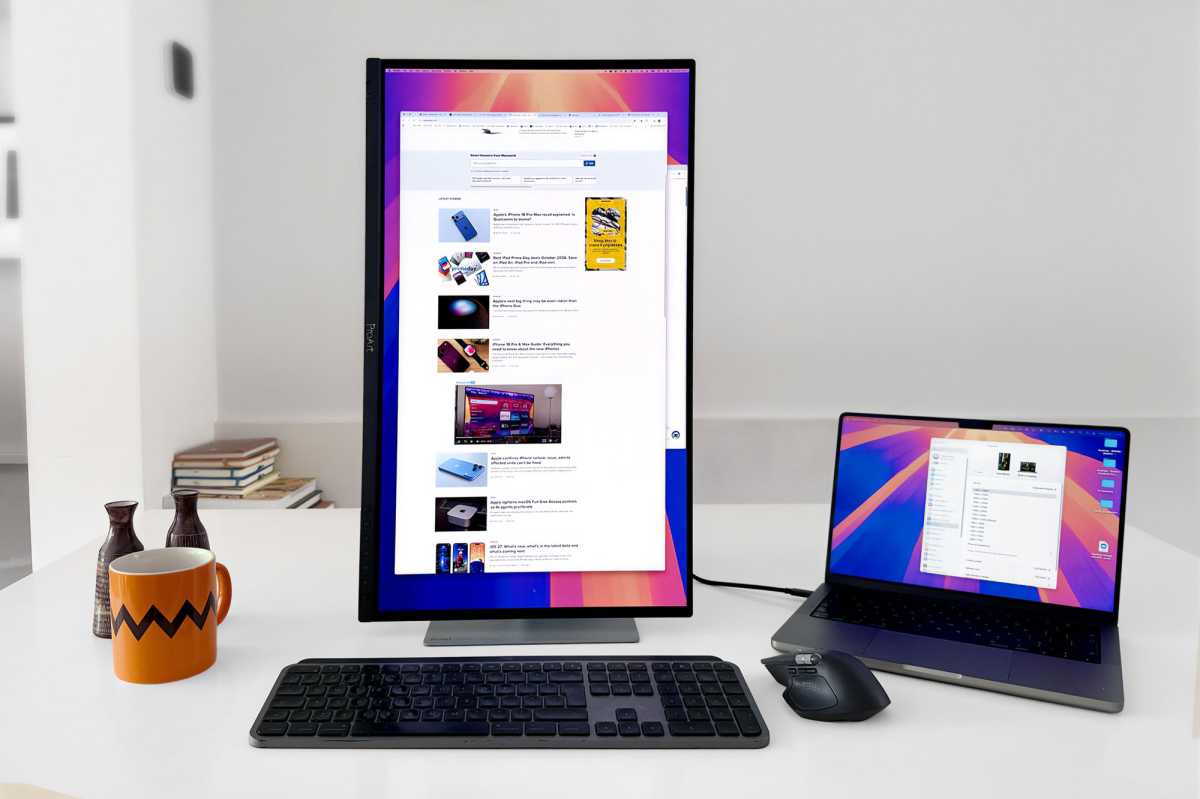 The ASUS ProArt is happy in Portrait as well as Landscape orientation. If you want a more vertical view of the Studio Display Apple will make you swap the stand for a VESA mount adapter.
Simon Jary
Apple’s biggest weapon in the fight is its 5K Retina advantage. The Studio Display packs 5120 x 2880 pixels, giving it a wonderful 218ppi pixel density, ensuring that text is exceptionally crisp and the interfaces look beautifully rendered.
The ASUS is 4K, at 3840 x 2160, and 166ppi. That’s still sharp, but put the two displays side by side and the difference is clear, particularly with text—important for writers, developers and anyone who spends eight hours staring at browser windows, documents and menus, and those with the extra cash in their pocket.
If your workload is primarily Safari/Mail/Word/Excel/coding/lots of text, the Apple Studio Display has a meaningful advantage, but then we’d recommend you look at more affordable 5K displays such as the $999/£899 BenQ MA270S or BenQ PD2730S or budget $699 KTC 5K2K Monitor. Don’t get me wrong, the text on the PA279CDV is great—just not 5K great.
Read our reviews for more of the best monitors for Mac.
The ProArt’s secret weapon is sitting behind all those pixels: its QD-OLED panel gives the ASUS a huge advantage in contrast, with deep blacks, virtually instantaneous response times and much more convincing HDR. Its 120Hz refresh rate also makes scrolling, animations and timeline scrubbing noticeably smoother than the Apple’s 60Hz panel. If you’ve become accustomed to the 120Hz ProMotion display on a MacBook Pro, the Studio Display’s 60Hz refresh rate can feel like a step backwards. The ASUS doesn’t make that compromise. For photography and especially HDR video work, the PA279CDV is the display I’d want in front of me.
Color performance is strong on both. ASUS targets professional creators with factory calibration, a Delta E (ΔE) below 1.5 and broad DCI-P3 coverage, while Apple offers a range of color and reference modes. For HDR video and visually demanding creative work, though, the ASUS’s OLED panel is the more compelling choice.
The ProArt’s studio-grade 99% DCI-P3 gamut ensures rich, vivid colors, making it ideal for color-intensive projects. The peak brightness of 1000 nits allows for outstanding contrast between its deeper blacks and brighter whites.
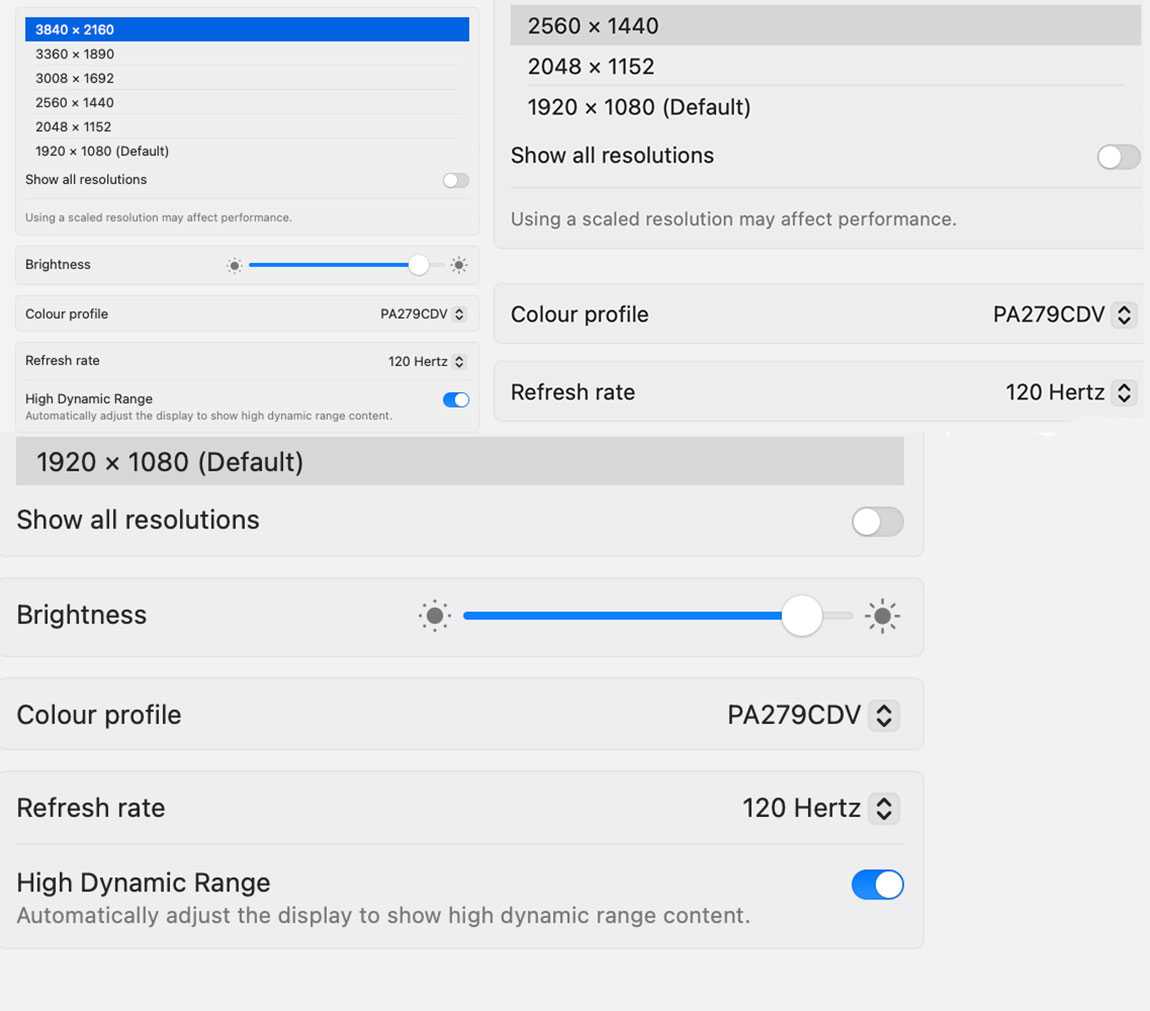 HDR and 120Hz refresh rate don’t go together on every resolution option, for example 2560 x 1440 pixels.
Simon Jary
OLED is the display technology for anyone who values image quality above all else. Its self-lit pixels deliver perfect blacks, exceptional contrast and near-instant response times, making HDR content, photos, video and games look spectacular. For creators and entertainment fans, OLED offers a richer, more immersive visual experience than IPS. If you spend most of your time on general productivity work, spend hours reading text, or work in brightly lit rooms, an IPS panel (and 5K if you can afford it) might make more sense.
ASUS employs OLED Care features to safeguard the display against image burn-in which can be a problem with OLED screens. This dynamically detects and identifies the task bar, logos, and video edges, reducing the brightness around them to minimise the risk of burn-in.
The peak brightness isn’t as stunning as on the Apple Studio Display XDR, but that costs around $3,000 compared to $699 for the ASUS.
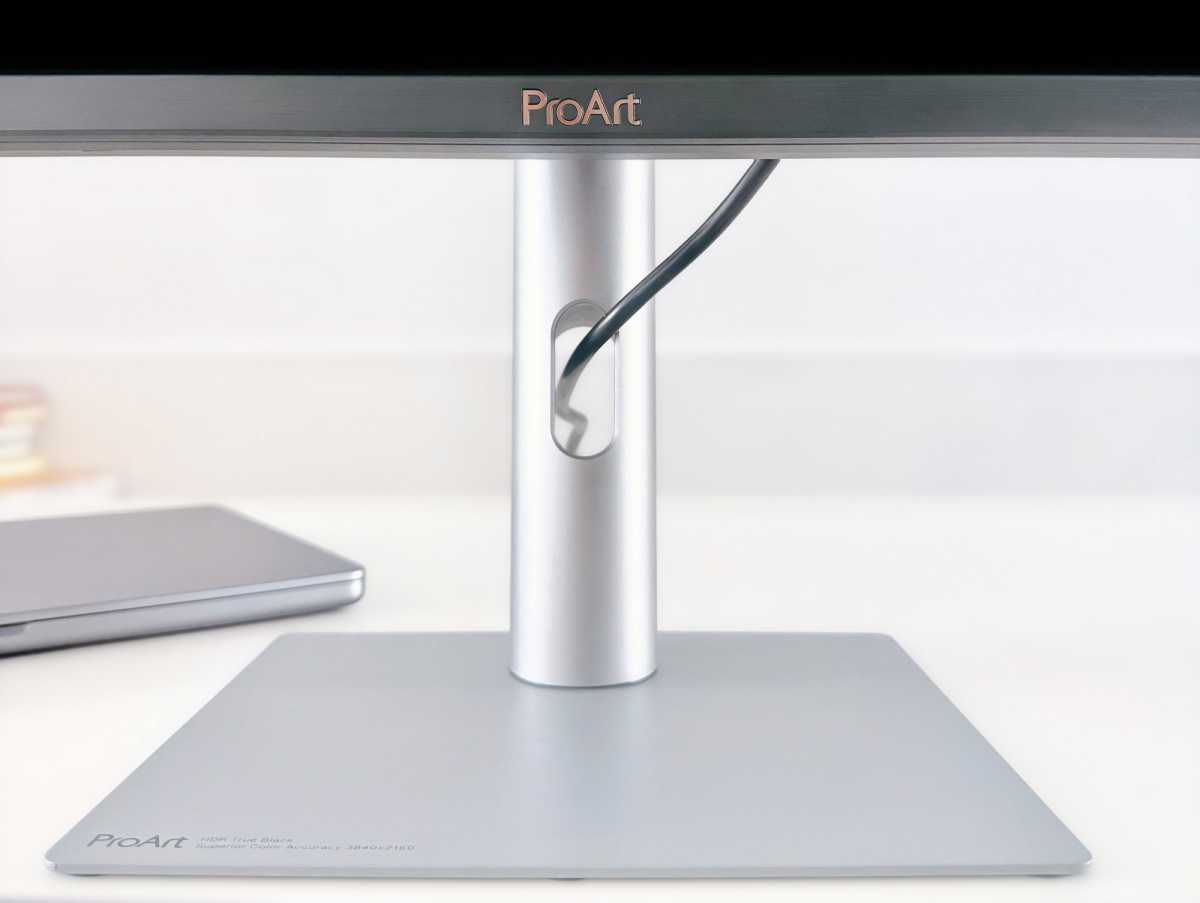 Cable management on the multi-adjustable stand is basic but appreciated.
 Simon Jary
Where Apple charges you an extra $400/£400 for its tilt and height-adjustable stand, this comes as standard with the ASUS ProArt, which offers tilt, swivel, 90° pivot, and 5-inch height adjustments for a more comfortable viewing experience. The small-footprint stand (shown above) also features basic built-in cable management, where cables can be passed neatly through an opening that should lead to a more organised workspace. To be fair to Apple, the Studio Display’s stand features the same, but some monitor stands don’t bother with this cable-clutter remover.
The monitor also tackles clutter by having a built-in power supply, so there’s no power brick sitting under your desk.
Does the ASUS have better connectivity than the Studio Display?Where Apple sticks rigidly to its Thunderbolt/USB-C connectors—with the Studio Display offering two 80Gbps Thunderbolt 5 and two 10Gbps USB-C ports—the ASUS ProArt gives you HDMI 2.1, 2x DisplayPort (daisy-chainable in and out), 3x USB-C (max. 5Gbps), 3x USB-A ports, a headphone jack, and 96W MacBook passthrough charging. With a built-in KVM, it can happily sit between a MacBook and a Windows PC, sharing your keyboard and mouse between them.
Data transfer is weak compared to Apple’s Thunderbolt 5, but plenty for the video connection.
Simon Jary
Apple’s approach is more prescriptive—it looks fantastic, but the ProArt behaves like a professional monitor rather than a beautifully packaged Mac peripheral.
Is the ASUS ProArt PA279CDV good value?Comparing like for like with a decent tilt and height-adjustable stand included, the Apple Studio Display’s $1,899/£1,899 price tag looks painful next to the ASUS ProArt’s much more affordable $699 / £649—also available at Amazon and Amazon UK. That extra is a lot to pay for the Studio Display’s 5K resolution plus webcam and superior speakers.
The ProArt’s speakers are pretty tinny, so you might want to invest $100-200 in better audio if using the screen for streaming or gaming. You’ll have change over to pick one of the best webcams for Mac we’ve reviewed to match the Apple Studio Display for video-call quality.
The more expensive ($899) Dell 32 Plus QD-OLED is similar except for its 31.6-inch size that gives you more screen space but a drop in sharpness.
ASUS has put a lot of effort into optimizing the ProArt for Mac users, including intuitive controls such as MacBook Keyboard Sync and matching up color temperature with your MacBook, with the ASUS DisplayWidget Center for macOS.
The Apple Studio Display remains the better choice if your priorities are razor-sharp text, great speakers, an excellent webcam, and effortless Mac integration. But the ASUS ProArt Display OLED PA279CDV is the more exciting display. 120Hz OLED, proper HDR, professional color, extensive connectivity and a genuinely adjustable stand make it hard to ignore—particularly for creative professionals.
| # | Наименование новости | Тональность | Информативность | Дата публикации |
|---|---|---|---|---|
| 1 | KYY X90G Quad Portable Monitor review: Three extra screens for your MacBook | 0 | 24.38 | 07-10-2026 |
| 2 | High Mac prices got you down? These Amazon deals offer major relief | 0 | 12.1 | 07-10-2026 |
| 3 | Best Prime Day Apple deals: Save on iPad, AirPods, Macs & Apple Watch | 0 | 22.12 | 07-10-2026 |
| 4 | BenQ’s new pro display puts color first, with a few compromises [Review] ★★★★☆ | 0 | 33.3 | 27-09-2026 |
| 5 | Best MacBook Prime Day Deals October 2026: Save on MacBook Air, Pro, Neo & Mac mini | 0 | 19.29 | 02-10-2026 |
| 6 | Best iPad Prime Day deals October 2026: Save on iPad Air, iPad Pro and iPad mini | 0 | 20.1 | 05-10-2026 |
| 7 | 3 Years With a QD-OLED – Burn In Update | 0 | 12.19 | 10-08-2026 |
| 8 | Обзор игрового QD-OLED-монитора ASUS ROG Strix OLED XG27AQDMES: самый доступный в линейке | 0 | 18.18 | 28-07-2026 |
| 9 | Official Apple refurb store has 2026 Studio Display with Tilt/Height-Adjustable Stand at $300 off | 0 | 21.88 | 28-09-2026 |
| 10 | Run Windows 11 Pro on your Mac with a $9.97 lifetime license | 0 | 13.76 | 03-10-2026 |