Просмотр новости
Найдите то, что Вас интересует
 Спутники
 РН
РН SpaceX
 Роскосмос
 NASA
NASA
СпутникиРНSpaceXРоскосмосNASAA one-line fix shouldn’t wait on the whole test suite. Yet a typical CI pipeline runs every test on every push, and a single flaky failure sends developers back to the rerun button.
CircleCI’s Smarter Testing addresses both problems. Test impact analysis tracks which source files each test executes, then runs only the tests affected by a code change. Auto rerun retries flaky tests inside the job instead of failing the build. Together, these features can dramatically reduce test execution time, wasted compute, and developer interruptions.
Early adopters have seen up to 4× faster test runs. In this tutorial, we’ll set up Smarter Testing on a sample TypeScript application, show how it catches regressions without running the full suite, and measure the impact on CI performance.
How Smarter Testing works
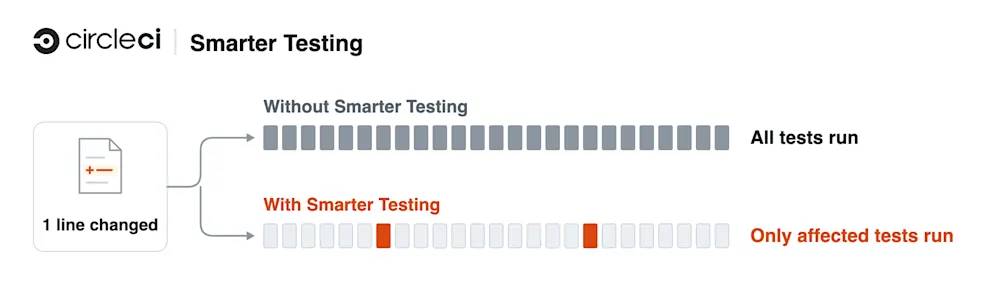
Smarter Testing runs through circleci testsuite, an extension to the CircleCI CLI. Instead of calling the test runner directly, a CI job calls circleci testsuite run, and the CLI decides which tests to run, how to split them across parallel nodes, and whether to retry failures. It has three features:
Running tests through circleci testsuite, with static timing-based splitting, is free on every plan. The three Smarter Testing features above are paid, counted by the test atoms each run discovers. A test atom is an independently executable unit of testing, such as a test file, package, or module, depending on the runner.
Smarter Testing isn’t tied to one test runner. Besides the Jest plugin used in this tutorial, CircleCI publishes coverage plugins for Vitest, Mocha, Cypress, pytest, and RSpec in smarter-testing-plugins, and Go uses its native coverage format.
The savings grow with the suite. At Clazar, a backend suite of roughly 4,000 tests was adding 12 to 15 minutes to every pull request. After the team turned on Smarter Testing, feature-branch runs dropped to 3 to 5 minutes.
See Smarter Testing in actionWatch how CircleCI selects affected tests from a suite of nearly 10,000 and compares the results with a full-suite run.
In this demonstration, test impact analysis identifies just 44 affected tests out of a suite of 9,716. Running the full suite took 3 minutes and 56 seconds across 15 nodes. With selective testing, the same code change completed in 22 seconds, more than 15× faster.
Next, we’ll walk through the setup using a sample application you can explore yourself.
PrerequisitesSetting up Smarter Testing requires a CircleCI account, a project on CircleCI, and a test runner that writes JUnit XML reports with each test’s file path.
Install the CircleCI CLI (brew install circleci on macOS), log in with circleci auth login, and install the testsuite extension:
circleci extension install testsuite
Our examples come from our demo repo: a TypeScript e-commerce API with two Jest suites, 25 unit test files (684 tests) and 18 integration test files (196 tests) that run against PostgreSQL. To use the demo rather than your own project, fork and clone the repository, install its dependencies, and follow it in CircleCI:
gh repo fork CIRCLECI-GWP/smarter-testing-demo --clone
cd smarter-testing-demo
npm ci
circleci project follow
Using a coding agent? CircleCI provides agent skills for setting up test suites and enabling Smarter Testing. You can ask your agent to “Set up CircleCI Smarter Testing for this project,” then review the proposed config changes and validate the setup with circleci testsuite doctor. The steps below show what’s involved and how to verify the results.
Smarter Testing reads suite definitions from .circleci/test-suites.yml. Each suite needs two commands: discover lists every test file, and run runs a given set of them. At run time, << test.atoms >> becomes the list of selected test files (Smarter Testing’s logs call each one a test atom), and the runner writes its JUnit report to << outputs.junit >>. That report is how Smarter Testing learns which tests ran and which failed.
For a Jest project with unit and integration suites, the file looks like this:
# .circleci/test-suites.yml
---
name: unit tests
discover: npx jest --listTests
run: JEST_JUNIT_OUTPUT_FILE="<< outputs.junit >>" npx jest --ci << test.atoms >>
outputs:
  junit: test-results/unit/results.xml
options:
  store-test-results: true
---
name: integration tests
discover: npx jest -c jest.integration.config.js --listTests
run: JEST_JUNIT_OUTPUT_FILE="<< outputs.junit >>" npx jest -c jest.integration.config.js --ci << test.atoms >>
outputs:
  junit: test-results/integration/results.xml
options:
  store-test-results: true
Other runners follow the same pattern: discover lists test files, and run executes the selected files. Once you’ve defined a suite, use circleci testsuite doctor to check that CircleCI can discover and run its tests. Because doctor executes tests locally, start any services they need first. In the demo, npm run db:up starts PostgreSQL in Docker:
circleci testsuite doctor "unit tests"
Every check should report success or skipped, and doctor shows how many test files it discovered (25 in the demo). The next_steps output identifies features to enable next. If doctor reports “The run command did not return any test results”, check that the runner generated a JUnit report and that its test cases include file paths. doctor and --local runs write state files to .circleci/, so add .circleci/impact-*.json and .circleci/state* to .gitignore.
Before the change, each test job in the demo’s .circleci/config.yml calls the test runner directly. The unit test job runs Jest and then uploads the results:
- run:
    command: npx jest --ci
    environment:
      JEST_JUNIT_OUTPUT_DIR: test-results/unit
- store_test_results:
    path: test-results
Replace both steps with a single call to circleci testsuite run, naming the suite from Step 1. The command lets Smarter Testing manage test execution and enables the features we’ll configure in the next steps. The suite’s store-test-results option uploads the results, as doctor recommends, so the job no longer needs its own store_test_results step. circleci testsuite is already available in CircleCI jobs, so there’s nothing to install in CI.
Do the same for every suite, and add parallelism to any job that should split across nodes:
unit-tests:
  executor: node
  steps:
    - install
    - run: circleci testsuite run "unit tests"

integration-tests:
  executor: node-with-postgres
  parallelism: 3
  steps:
    - install
    - run:
        name: Wait for Postgres
        command: dockerize -wait tcp://localhost:5432 -timeout 1m
    - run: circleci testsuite run "integration tests"
Commit and push to the default branch. Test impact analysis and auto rerun aren’t enabled yet, so the Tests tab should show the same test counts as before. The integration suite now splits across three nodes, and from the next build on it balances them by timing.
Step 3: Turn on test impact analysisTest impact analysis needs coverage for each test file, which a CircleCI coverage plugin collects. For Jest, install the plugin and the Node test environment it wraps, at the same major version as Jest (30 in the demo):
npm install --save-dev @circleci/jest-circleci-coverage jest-environment-node@^30
Then configure Jest to use the coverage environment and reporter. In the demo, replace the existing testEnvironment and reporters entries in jest.shared.js:
testEnvironment: '@circleci/jest-circleci-coverage/environment-node',
reporters: [
  'default',
  ['jest-junit', { addFileAttribute: 'true', suiteNameTemplate: '{filepath}' }],
  '@circleci/jest-circleci-coverage/reporter',
],
Other runners need a similar line or two, described in each plugin’s README. For Vitest, Jest, and Mocha, circleci testsuite doctor prints the setup when a suite has test impact analysis turned on and no analysis command.
Next, add an analysis command and three options to each suite. Here’s the demo’s unit suite with the new lines:
# .circleci/test-suites.yml
---
name: unit tests
discover: npx jest --listTests
run: JEST_JUNIT_OUTPUT_FILE="<< outputs.junit >>" npx jest --ci << test.atoms >>
analysis: CIRCLECI_COVERAGE="<< outputs.circleci-coverage >>" npx jest --ci --runInBand << test.atoms >>
outputs:
  junit: test-results/unit/results.xml
options:
  store-test-results: true
  impact-key: unit
  test-impact-analysis: true
  full-test-run-paths:
    - package-lock.json
    - tsconfig.json
    - jest.config.js
    - jest.shared.js
    - tests/setup.ts
Make the same additions to the integration suite, setting impact-key: integration, adding -c jest.integration.config.js to its analysis command, and including its config file and tests/integration/support/** under full-test-run-paths.
What each piece does:
analysis runs the tests with the plugin recording coverage.impact-key keeps each suite’s impact map separate. In a monorepo, give each package’s suites their own key and run circleci testsuite from that package’s directory.full-test-run-paths lists files whose changes run everything, because coverage can’t tie them to any single test. Include the lockfile, build and test config, and any setup file that runs before every test. Leave a file off, and selection can skip the tests that a change to it breaks.Run doctor again, then commit and push to the default branch. Skip doctor’s “Generate CI impact data” suggestion, because the default-branch build does the same work. On the default branch, circleci testsuite run runs every test, so anything a branch skipped still runs after the merge, then analyzes the affected ones to update the impact map.
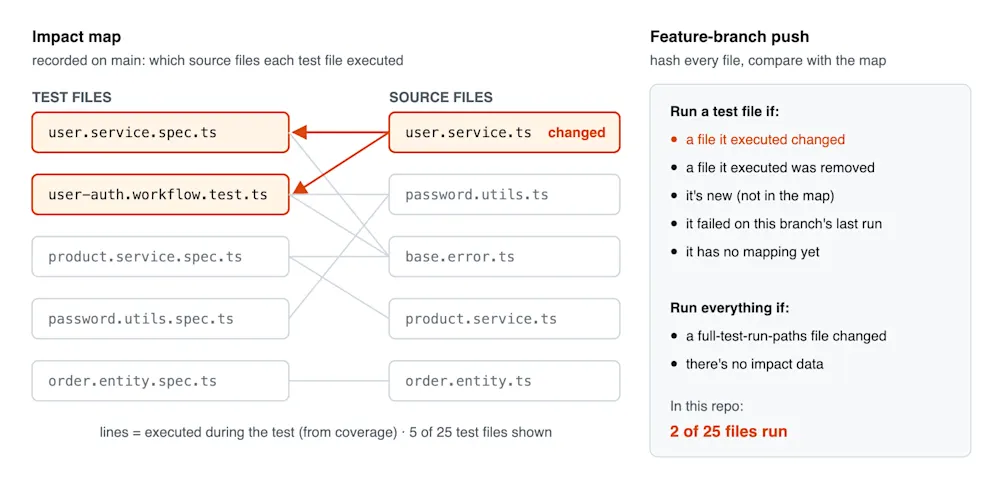
On feature branches, CircleCI selects only the impacted tests. The first analysis takes the longest, because it covers every test file. After that, a one-file merge added about 12 seconds in our runs. To keep analysis off the critical path, run it in a separate, non-blocking job. The build’s log shows it working (the version number will differ):
Selecting all test atoms, no impact analysis available
Selected 25 test atoms, Skipped 0 test atoms in 0s
Running 25 test atoms
Ran 25 test atoms in 18.913s
Patching test impact data version: 35
Analyzing 25 test atoms
Found 4 files impacting test src/services/user-management/services/user.service.spec.ts
Once the default-branch build is green, create a branch, change a source file, and push the branch to CircleCI. Each test job’s log reports how many test files were selected and skipped, and the Tests tab lists only the tests that ran.
To preview selection before pushing, build an impact map locally once, then check a branch against it. The --local flag keeps the impact map on the machine and uploads nothing to CircleCI:
circleci testsuite run "unit tests" --local --run-tests=none --analyze-tests=all
circleci testsuite run "unit tests" --local --run-tests=impacted --analyze-tests=none
In the demo, npm run demo:analyze runs the first command, and npm run demo:leaf makes a one-line change on a demo/leaf branch and runs the second. The change rewords an error message in user.service.ts. The preview should end like this:
- 2 test atoms impacted by modified files
Selected 2 test atoms, Skipped 23 test atoms
PASS  src/services/user-management/services/user.service.spec.ts
PASS  tests/workflows/user-auth.workflow.test.ts
Tests:       44 passed, 44 total
Pushing the branch shows the same selection in CI:
git push -u origin demo/leaf
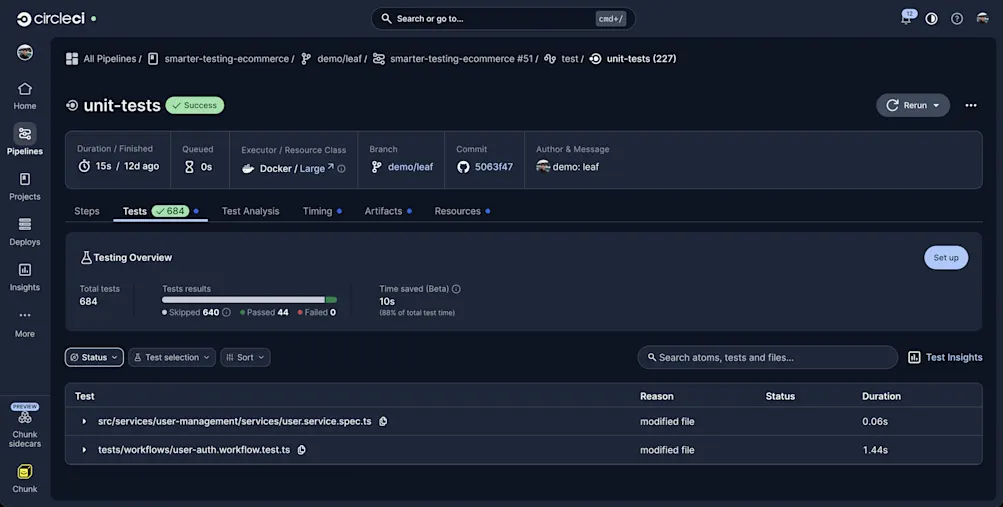
The unit tests pass, because they mock the database layer and never check the exact error text. The integration suite selects 4 of its 18 files, and one of them catches the reworded message:
FAIL tests/integration/users/login-lockout.int.test.ts
  ✕ refuses suspended and deleted accounts
    Expected substring: "Account has been deleted"
    Received message: "This account has been deleted"
The test that caught the change still ran, and selection skipped the other 14 integration files, which never executed user.service.ts. Coverage only sees code that runs inside a test, so keep a type check or build on every commit, as the demo’s lint-and-typecheck job does.
Auto rerun retries failed test files inside the same job, before the build fails. Switch back to the default branch first (in the demo, npm run demo:reset returns to main and deletes the demo/* branches). Then turn auto rerun on with one option per suite in .circleci/test-suites.yml:
options:
  # ...
  max-auto-rerun: 2
Commit and push to the default branch. In the demo, npm run demo:flaky adds a test that fails on its first attempt and passes when retried (the code labels it a simulated flake):
npm run demo:flaky
git push -u origin demo/flaky
Test impact analysis selects the new file, and the unit job’s log shows the retry:
- 1 new test atoms
Selected 1 test atoms, Skipped 25 test atoms in 12ms
Running 1 test atoms
FAIL tests/workflows/simulated-flake.workflow.test.ts
Rerunning failed tests...
Running 1 test atoms
PASS tests/workflows/simulated-flake.workflow.test.ts
Reran 1 test atoms in 1 attempts in 3.706s
The 3.0-second result reported below comes from a separate benchmark using a synthetic test that failed half the time.
The job passes, its Tests tab still records the failed attempt, and Insights lists the test as flaky. Keep max-auto-rerun low and treat every pass-on-retry as a bug to fix, because a real race condition can look like a flaky test.
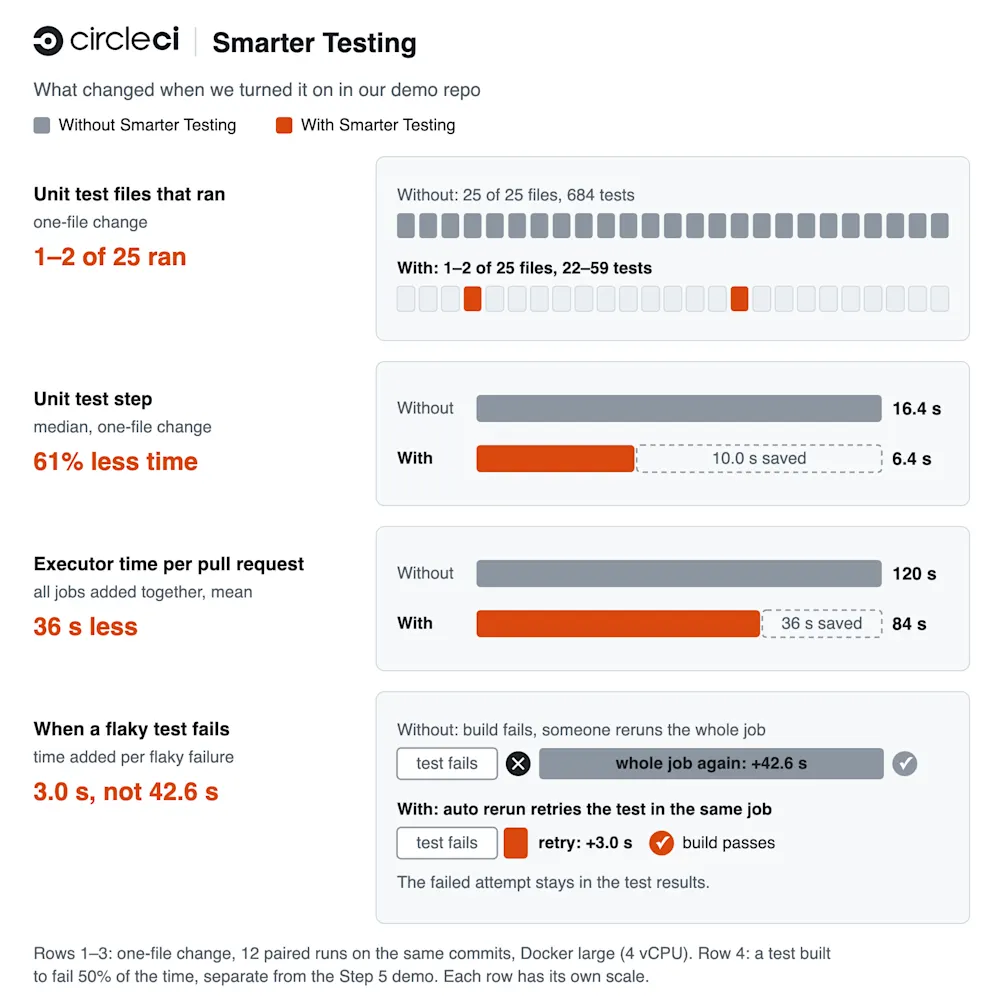
On a one-file change, test impact analysis ran only 1 or 2 of the 25 unit test files, 22 to 59 tests instead of all 684. That cut the median unit test step from 16.4 seconds to 6.4 across 12 paired runs, about 61% less.
Across every job in the pipeline, mean executor time per pull request fell from 120 seconds to 84, about 30% less.
Auto rerun made the biggest difference on flaky failures. When a synthetic test that failed half the time broke the build, rerunning the whole job added 42.6 seconds, but auto rerun retried just that file in 3.0 seconds, and the failed attempt stayed on record.
Each comparison ran with and without Smarter Testing on the same commit and in the same pipeline, on Docker large (4 vCPU).
Smarter Testing eliminated much of the unnecessary test execution while still catching a real integration regression. The video demonstration and Clazar’s production results show how those savings can grow into minutes per build. Multiply those gains across hundreds of daily builds, dozens of projects, and entire engineering organizations, and the potential impact on developer wait time and CI compute costs becomes substantial.
ConclusionTest impact analysis cut the unit test step by more than half on a one-file change, and it still ran the integration test that caught the bug. Auto rerun let a flaky test recover inside the job without hiding the failure. The setup takes a suite file and a coverage plugin, plus a one-line change to each test job.
For teams running hundreds of builds across multiple projects, fewer unnecessary tests and faster recovery from flaky failures mean less time waiting for CI and less compute spent repeating work.
Sign up for a free CircleCI account and follow the Smarter Testing setup guide to enable these features in your own pipelines.
| # | Наименование новости | Тональность | Информативность | Дата публикации |
|---|---|---|---|---|
| 1 | CircleCI Smarter Testing: Stop running tests that don't matter | 0 | 10 | 26-08-2026 |
| 2 | Getting started with the CircleCI CLI | 0 | 10 | 22-10-2026 |
| 3 | A faster, more reliable GitHub Actions alternative: Run Actions on CircleCI | 0 | 8.26 | 22-09-2026 |
| 4 | Stacked PRs: what they are and how to run CI on a stack | 0 | 10 | 16-10-2026 |
| 5 | Rebuilding the CircleCI CLI from scratch | 0 | 5 | 07-07-2026 |
| 6 | How to improve agent experience (AX) with CI | 0 | 10 | 23-09-2026 |
| 7 | sentry-test 2.3.0 | 0 | 47.5 | 22-10-2026 |
| 8 | leasehold 0.4.0 | 0 | 20.53 | 22-10-2026 |
| 9 | Best CI/CD Concepts for DevOps | 5 | 7 | 06-03-2026 |
| 10 | Transform Freight Operations with Smarter Freight Management Software | 0 | 7.66 | 11-08-2026 |