Просмотр новости
Найдите то, что Вас интересует
 Спутники
 РН
РН SpaceX
 Роскосмос
 NASA
NASA
СпутникиРНSpaceXРоскосмосNASA
Apple's new AI-powered Extend and Reframe image tools in iOS 27, iPadOS 27 and macOS 27 show real promise.
(via Cult of Mac - Your source for the latest Apple news, rumors, analysis, reviews, how-tos and deals.)
 Apple's new AI-powered Extend and Reframe image tools show real promise.
 The Reframe and Extend tools Apple added to the Photos app in iOS 27, iPadOS 27 and macOS 27 are excellent examples of how AI can be used to improve our lives. With these AI-powered editing options, a picture that’s almost amazing can be noticeably improved.
Plus, they don’t have the drawbacks of artificial intelligence that make so many people uncomfortable.
Apple Photos app makes it easy to enhance your picsBefore sharing a photo with friends or family, it’s worth taking a few moments with the editing tools built into Apple’s Photos app to tweak the look. Even the automatic enhancement tool can do a lot to make your image better.
And with a just a bit more effort, you can crop, straighten, adjust the brightness and correct the color… all of which can dramatically improve the appearance of an image without requiring any special photography skills.
With iOS 27, iPadOS 27 and macOS 27, Apple expands your options with new Extend and Reframe tools. And the Clean Up tool got significantly better, too.
Clean Up tool in Apple Photos: Much improvedThe Clean Up tool in the Photos app is one of the original Apple Intelligence features from back in 2022. But it never works very well. Fortunately, that’s changed.
“The popular Clean Up tool gets a major upgrade, so users can remove distractions with better quality and more realistic infill, even when the scene is complex,” said Apple.
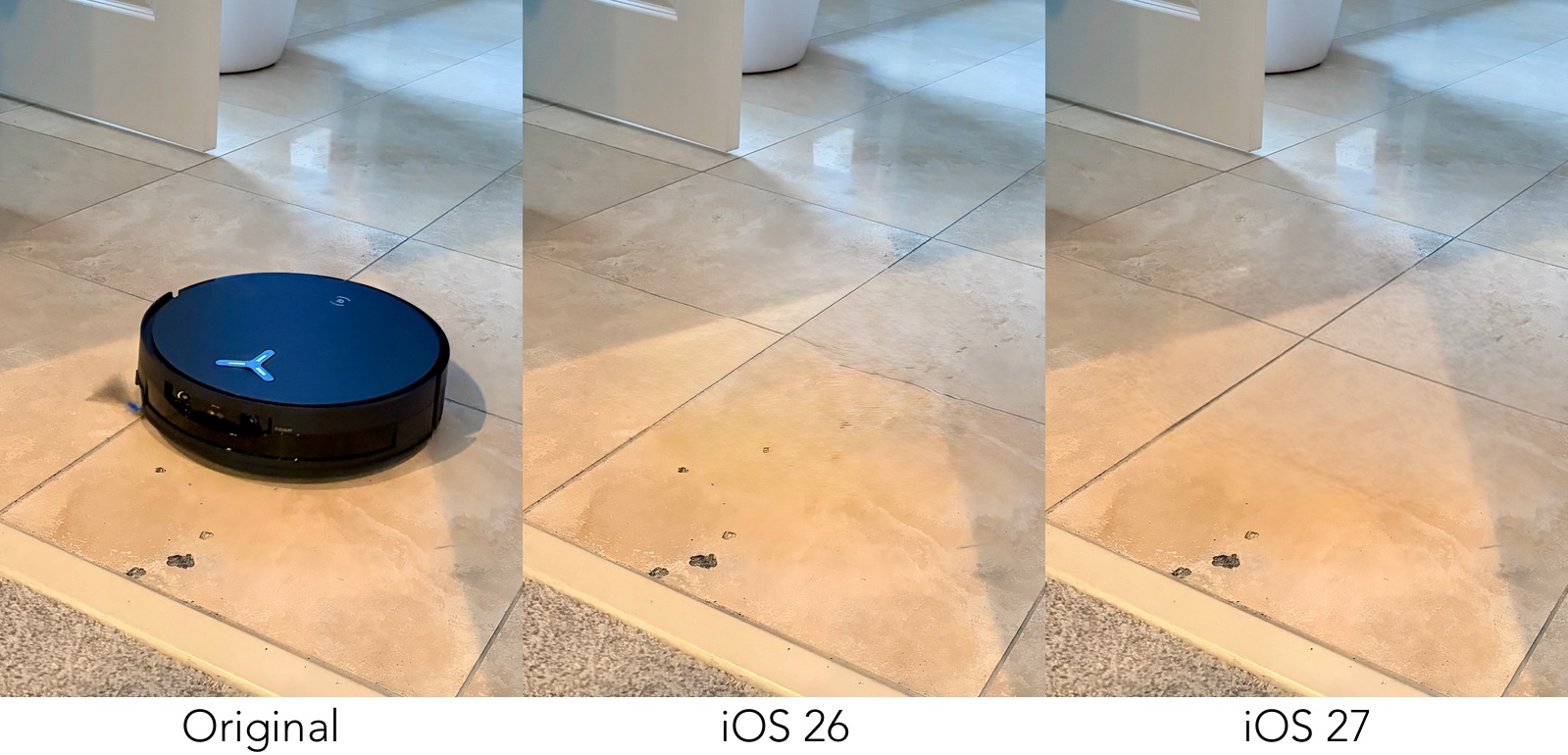 The Clean Up tool in Apple Photos used to stink. Not anymore. (Click for larger image)
I tested it with iPadOS 27 beta 1, and the improvement is noticeable — I included a simple example above to demonstrate. The old version of Apple Intelligence couldn’t even figure out that the lines around the floor tiles it needed to fill in should be straight. But iPadOS 27 handled this easily.
Then I went to something more challenging.
 Apple’s upgraded Clean Up tool in Apple Photos is finally useful. (Click for larger image)
For my next test, I asked the Clean Up tool in iPadOS 27 to remove the pumpkin from behind Murphy the dachshund. As you can see from the before-and-after picture above, it did a brilliant job of it.
Note that I did this with the High Quality setting selected. The Fast option made a complete hash of it.
Previously, the Clean Up tool was an exercise in frustration. No longer.
Extend tool in iOS 27 Photos app: It worksA major new option coming to the Photos app in iOS 27, macOS 27 and iPadOS 27 is the AI-powered Extend tool.
“Users can also expand images with the Extend tool to give their subjects more breathing room,” explained Apple. “For example, they can straighten a crooked horizon without cropping out anything important, or adjust the aspect ratio, and Extend will fill in the missing pieces.”
 The Photos app can use AI to Extend what’s shown in your pictures. (Click for larger image)
I tested it for myself with iPadOS 27 beta 1. I used a picture of one of my sister’s cats taken with my iPhone running iOS 26, and asked the Photos app to Extend the image on all four sides.
It did the job quite well. Not perfectly, but acceptably.
Note that accomplishing the goal required Apple Intelligence to simply make up many details. My sister’s house does not include the balcony you see across the top of the picture. The white door on the right also does not exist.
Reframe tool in iOS 27 Photos app: Kind of amazingThe goal of the new AI-enabled Reframe tool is ambitious, to say the least.
“With Spatial Reframing, users can improve the composition of a photo after it’s been taken,” said Apple. “Spatial Reframing builds on Apple’s deep understanding of spatial models thanks to Apple Vision Pro, so users can touch and drag a photo and preview in real time how the perspective shifts — as if they’d repositioned the camera in the original scene.”
 The Photos app can now change the angle a picture was shot from. (Click for larger image)
I tested this with a picture of another one of my sister’s cats, and it worked surprisingly well. I’m impressed.
That said, there are problems. I don’t think the cat’s muzzle was properly reframed, so her head looks… odd. But this image got produced by first beta of the software — improvements are possible.
Not your typical artificial intelligence toolsMany people push back against AI, but these tools are ones that’s everyone can embrace.
Most notably, they use Apple Foundation Models running directly on our iPhones, iPads and Macs, not a data center somewhere. Which also means they are completely private — the only computer seeing your images belongs to you.
And these AI-driven tools aren’t taking work from professional artists. Making pictures of your puppy or baby look better before posting them on social media isn’t something a pro does. If you’re talking about your wedding photos, you should still get a pro because Apple’s tools are not up to that. They are good, but not that good.
Coming this fallThe Reframe and Extend tools, as well as the revamped Clean Up tool, are part of the Photos app in iOS 27, iPadOS 27 and macOS 27, which are scheduled to launch this fall.
Developers already have access to the first betas, though. Or anyone willing to pretend they are a developer.
Ed Hardy has been writing full-time about tech for 26 years, and using it for much longer than that. His intro to Apple was a Macintosh SE/30 (which he still has), but now he uses a 13-inch iPad Pro as his primary computer.
That’s because he’s a “tablet first” type of guy. Rather than use a Macbook, he connects a keyboard case to the iPad. And instead of a desktop Mac, he connects his tablet to a 27-inch display and full-size keyboard. (So don’t try to tell him that everyone has to use a Mac to be productive.)
Before coming to Cult of Mac, Ed wrote for NotebookReview, TabletPCReview and Brighthand, as well as other sites.

| # | Наименование новости | Тональность | Информативность | Дата публикации |
|---|---|---|---|---|
| 1 | Shocker! Image Playground in iOS 27 is actually useful. | 0 | 25.24 | 15-06-2026 |
| 2 | 7 best AI apps for Mac (and how I actually use them) | 0 | 21.68 | 16-05-2026 |
| 3 | Apple unveils new Siri AI, dedicated app, and enhanced Apple Intelligence features in iOS 27 | 0 | 19.26 | 08-06-2026 |
| 4 | iPhone software patch fixes nasty iOS 27 freeze bug and more | 0 | 27.97 | 28-09-2026 |
| 5 | Apple Creator Studio gets a big batch of new features | 0 | 20.91 | 30-09-2026 |
| 6 | Apple releases iPadOS 27, here’s what’s new for iPad | 0 | 27.4 | 14-09-2026 |
| 7 | 5 Macs rumored to launch in the coming months | 0 | 27.29 | 28-09-2026 |
| 8 | iOS 27, macOS 27 и другие новые ОС Apple стали доступны всем пользователям | 0 | 14.18 | 15-09-2026 |
| 9 | Apple announces release date for iOS 27, iPadOS 27, macOS 27, watchOS 27, and other updates | 0 | 14.96 | 09-09-2026 |
| 10 | List of major features rolling out today with Apple's iOS 27 update | 0 | 16.54 | 14-09-2026 |
