Просмотр новости
Найдите то, что Вас интересует
 Спутники
 РН
РН SpaceX
 Роскосмос
 NASA
NASA
СпутникиРНSpaceXРоскосмосNASA
h2 {
margin-top: 2em;
}
table {
width: 100%;
border-collapse: collapse;
font-size: 0.95em;
}
th, td {
border: 1px solid #d0d0d0;
padding: 10px 14px;
text-align: left;
vertical-align: middle;
}
thead th {
background-color: #f5f5f5;
font-weight: 600;
}
tbody tr:nth-child(even) {
background-color: #fafafa;
}
td:nth-child(3),
td:nth-child(4),
td:nth-child(5) {
text-align: center;
}
[
{
"@context": "https://schema.org",
"@type": "FAQPage",
"mainEntity": [
{
"@type": "Question",
"name": "Is it legal to download a YouTube video and create a karaoke version?",
"acceptedAnswer": {
"@type": "Answer",
"text": "Downloading YouTube content may conflict with YouTube's Terms of Service depending on the content and use. Personal, non-commercial use of content you have rights to (or that is licensed for download) is the safest context. Always check the rights status of specific content before distributing a karaoke version publicly."
}
},
{
"@type": "Question",
"name": "Can I download just the audio from YouTube instead of the full video?",
"acceptedAnswer": {
"@type": "Answer",
"text": "Yes. 4K Video Downloader Plus allows you to select audio-only formats (such as MP3 or M4A) when downloading. For the same purpose, you can use 4K YouTube to MP3."
}
},
{
"@type": "Question",
"name": "How long does vocal removal take?",
"acceptedAnswer": {
"@type": "Answer",
"text": "Processing time depends on track length and hardware. On a modern computer with a compatible GPU, a standard 3–5 minute song typically processes in under a minute. CPU-only processing on older hardware takes longer and varies by system."
}
},
{
"@type": "Question",
"name": "Will the karaoke track include lyrics displayed on screen?",
"acceptedAnswer": {
"@type": "Answer",
"text": "No. Vocal removal strips the audio vocal track. It does not add on-screen lyrics. For lyrics display, you would need a separate karaoke player or software that supports LRC or CDG lyric files."
}
},
{
"@type": "Question",
"name": "Does 4K Video Downloader Plus support platforms other than YouTube?",
"acceptedAnswer": {
"@type": "Answer",
"text": "Yes. The app supports YouTube, SoundCloud, Dailymotion, Twitch, Bilibili, Rumble, BitChute, Vimeo, and many other platforms. The same download-then-process workflow applies to any supported source."
}
},
{
"@type": "Question",
"name": "Can I use a karaoke track created this way for a public performance or streaming?",
"acceptedAnswer": {
"@type": "Answer",
"text": "No, not without clearing the underlying music rights. Instrumental versions created by AI vocal removal are derivative works. Public performance and broadcast require licensing from the rights holders of the original composition and recording."
}
},
{
"@type": "Question",
"name": "What if AI processing fails or produces errors?",
"acceptedAnswer": {
"@type": "Answer",
"text": "If processing fails despite meeting system requirements, 4K Download recommends generating a DxDiag report (Windows) or equivalent diagnostic report on other operating systems and contacting support at support@4kdownload.com."
}
},
{
"@type": "Question",
"name": "What audio quality can I expect from a karaoke track made with AI vocal removal?",
"acceptedAnswer": {
"@type": "Answer",
"text": "AI vocal removal tools currently achieve 85–98% accuracy depending on the source material. Quality is highest on modern pop, hip-hop, and electronic tracks. Tracks with heavy reverb, close harmonics, or complex layering may show more bleed. For karaoke purposes, like home use, singing practice, teaching, informal performance, the quality of current AI tools is generally sufficient."
}
}
]
},
{
"@context": "https://schema.org",
"@type": "HowTo",
"name": "How to Make a Karaoke Track from a YouTube Video with 4K Video Downloader Plus",
"description": "Download a YouTube video and remove vocals to create a karaoke backing track using 4K Video Downloader Plus on Windows, macOS, or Ubuntu.",
"step": [
{
"@type": "HowToStep",
"position": 1,
"name": "Open the app",
"text": "Open 4K Video Downloader Plus on your computer."
},
{
"@type": "HowToStep",
"position": 2,
"name": "Copy the YouTube URL",
"text": "Copy the YouTube URL of the music video you want to convert to karaoke."
},
{
"@type": "HowToStep",
"position": 3,
"name": "Paste the link",
"text": "Click \"Paste Link\" inside the app. If Smart Mode is enabled, the download starts automatically. If not, select your preferred format and quality."
},
{
"@type": "HowToStep",
"position": 4,
"name": "Media Tools",
"text": "Once the file is downloaded, click the \"Media Tools\" button next to the file."
},
{
"@type": "HowToStep",
"position": 5,
"name": "Remove vocals",
"text": "Select \"Remove Vocals\" from the Media Tools menu and wait for processing to complete."
},
{
"@type": "HowToStep",
"position": 6,
"name": "Use the output",
"text": "Find the processed karaoke file in the main downloads list and in the dedicated "Processed" list. Play or export it from there."
}
]
}
]
"Is there a way to make a karaoke version of a YouTube song without needing a DAW or separate software?" it's one of the most common questions in music communities online. The short answer: yes, and it takes about two minutes.
To create a karaoke track from a YouTube video, you need to do two things: download the audio from the video, and remove the vocals from the track. With 4K Video Downloader Plus, both steps happen inside a single app, so you download the video, click "Media Tools," select "Remove Vocals," and the instrumental karaoke version appears in your library within minutes, with no third-party software required.
Why Make a Karaoke Track from YouTube?
YouTube is the world's primary music library by watch time: music videos account for 25% of all watch time on the platform, and "karaoke" draws approximately 22–24 million monthly searches on YouTube as of 2025–2026, which places it among the top global search terms on the platform. Billions of music videos on YouTube have no official karaoke version. Creating one yourself is the practical solution for singers, music teachers, party hosts, and content creators who need an instrumental backing track for a specific song.
What's the Fastest Way to Create a Karaoke Track from YouTube in 2026?
4K Video Downloader Plus is the only tool in the category that combines YouTube downloading and AI vocal removal into a single interface, so no separate upload and no switching apps is required.
The global karaoke market was valued at between $873 million and $1.8 billion in 2024, depending on the segment measured, with projections pointing to steady growth through 2030–2035. Home karaoke adoption has grown over 35% among US millennials and Gen Z consumers, driven largely by the availability of digital tools that make vocal removal fast and accessible to non-engineers.
The Two-Step Method: 4K Video Downloader Plus with Built-In Media Tools
4K Video Downloader Plus is a desktop app for Windows, macOS, and Ubuntu that combines video downloading with built-in audio processing. As of March 2026, the app includes a "Media Tools" feature that applies vocal removal directly to any downloaded file, without exporting to a separate editor.
Which Media Tools Are Available in 4K Video Downloader Plus?
The app currently offers four audio processing options:
Tool
What it does
Karaoke use case
Remove Vocals
Detects and removes the vocal track while preserving the instrumental
Primary tool for making karaoke backing tracks
Extract Vocals
Isolates the vocal track, removes instrumentals
Creating acapella versions for practice or remixing
Extract Voice
Separates spoken voice from background sound (music, noise)
Podcast cleanup, dialogue extraction
Remove Echo
Reduces room reflections and reverberation
Cleaning up recordings made in live and echoey spaces
For karaoke creation, Remove Vocals is the relevant tool.
How to Make a Karaoke Track in 4K Video Downloader Plus
Open 4K Video Downloader Plus on your computer. It’s available on Windows, macOS, and Ubuntu.
Copy the YouTube URL of the music video you want to convert to karaoke.
Click "Paste Link" inside the app. If Smart Mode is enabled, the download starts automatically. If not, select your preferred format and quality before downloading.
Wait for the download to complete. The file appears in your downloads list.
Click the "Media Tools" button next to the downloaded file.
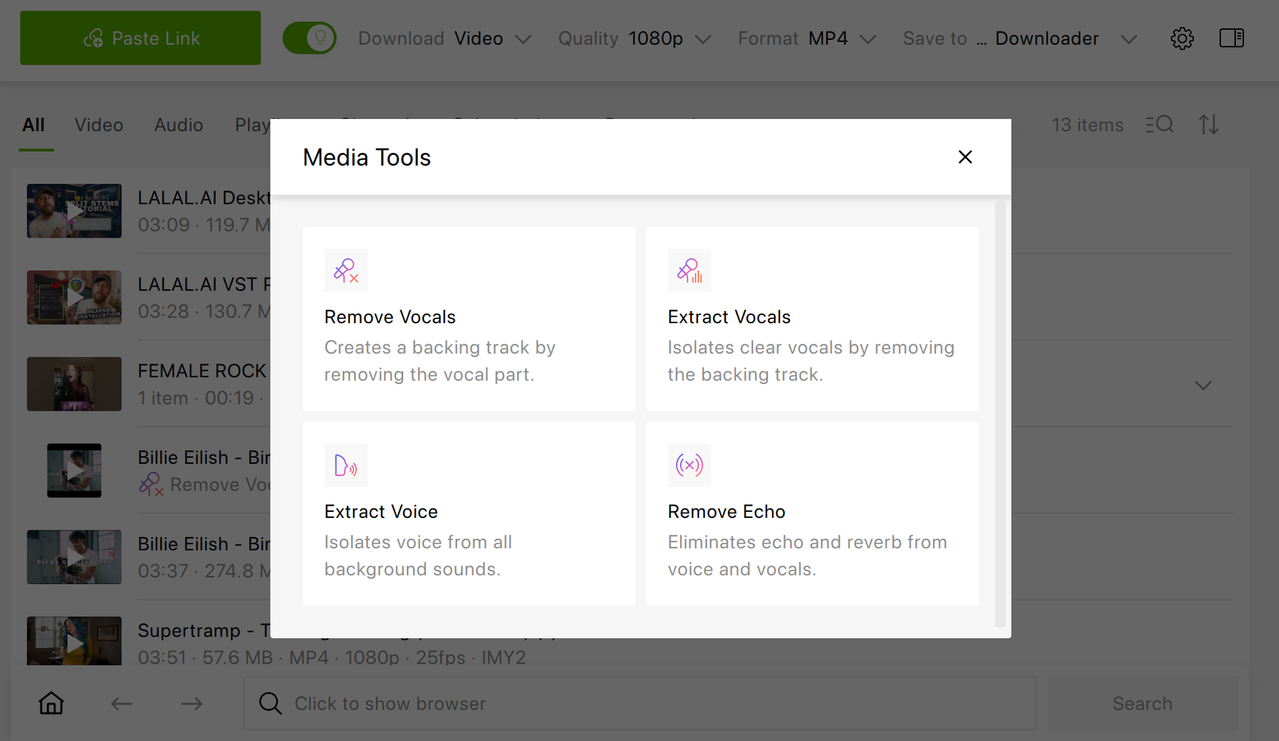
Select "Remove Vocals" from the menu.
Wait for processing to finish. The time depends on hardware: GPU-equipped machines run significantly faster than CPU-only systems.
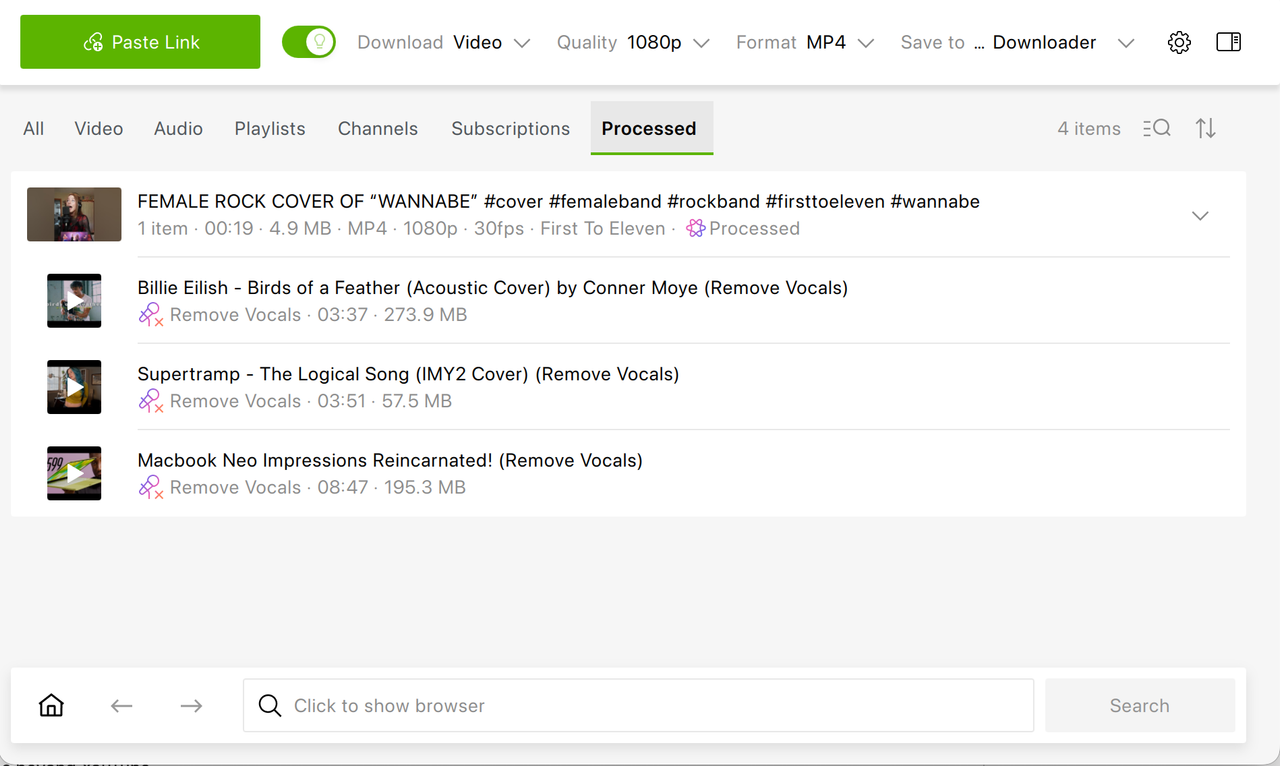
Find the output file in the main downloads list and in the dedicated "Processed" list. Play or export it from there.
The entire process requires no audio editing knowledge and no separate software. 4K Video Downloader Plus also supports SoundCloud, Dailymotion, Twitch, Bilibili, Rumble, BitChute, Vimeo, and many other platforms, so the same workflow applies to music videos beyond YouTube.
Hardware and Performance Notes
Audio processing is computationally intensive. By default, 4K Video Downloader Plus runs processing on the CPU across all supported operating systems. On compatible systems, GPU acceleration activates automatically and delivers faster results. NVIDIA and AMD GPUs with hardware acceleration support are recommended for smoother performance. Users on older machines or systems without a dedicated GPU will experience longer processing times.
If processing fails despite meeting system requirements, generate a DxDiag report on Windows (or an equivalent diagnostic report on other operating systems) and contact support at support@4kdownload.com.
Alternative Methods: Other Tools for Creating Karaoke Tracks
Several other tools can handle vocal removal, with different trade-offs in workflow, cost, and output quality. All of them require obtaining the audio file separately before processing, which is an additional step compared to 4K Video Downloader Plus.
LALAL.AI: Best Separation Quality for Professional Use
LALAL.AI is available as a web tool, mobile app, desktop app, API, and VST. It’s a stem separation platform that uses proprietary neural network models, including the Andromeda engine released in late 2025. It separates vocals, instrumentals, drums, bass, piano, electric guitar, acoustic guitar, synthesizer, strings, and wind instruments, so it’s the widest stem set available in the category.
LALAL.AI is subscription-based, which can be rather pricey for enthusiasts. Plus, it doesn’t download YouTube content directly, so users must obtain the audio file first.
Moises: Best for Practicing Musicians
Moises is a subscription-based tool with native iOS and Android apps, chord detection, pitch control, and tempo adjustment layered on top of stem separation. It suits musicians who need features beyond simple vocal removal, slowing a track for practice, transposing to a different key. According to the Meta benchmark report of late 2025, separation quality is generally considered slightly below LALAL.AI but sufficient for karaoke use. It doesn’t download YouTube content directly.
VocalRemover.org: Free, Browser-Based, No Installation
VocalRemover.org is a free browser-based tool with no installation required. It’s suited to occasional, casual use. Quality is lower than paid alternatives, and there are file size limits. Audio must be downloaded separately before uploading.
Ultimate Vocal Remover 5 (UVR5): Free Desktop App for Technical Users
UVR5 is a free, open-source desktop application for Windows, macOS, and Linux. It supports multiple AI models including MDX-Net and Demucs. It offers strong quality at no cost but requires more setup than consumer tools and is best suited to tech-savvy users comfortable with desktop audio software. You can get UVR from GitHub.
Spleeter: Open-Source, Developer-Oriented
Spleeter is Deezer's open-source stem separation library, the foundation on which many commercial tools are built. It’s free and powerful but operates via command line, making it accessible primarily to developers and technically proficient users.
Tools Compared
Tool
Downloads from YouTube
Vocal removal built-in
Requires separate upload
Cost
Platform
4K Video Downloader Plus
✔
✔
✖
Free tier; paid license
Windows, macOS, Ubuntu
LALAL.AI
✖
✔
✔
Subscription from $7.5/mo (billed annually). Free preview & 10 minutes
Web / API / VST / desktop / mobile
Moises
✖
✔
✔
From $39/year
Web, iOS, Android, desktop
VocalRemover.org
✖
✔
✔
Free
Web
UVR5
✖
✔
✔
Free
Desktop
Spleeter
✖
✔
✔
Free
CLI
The key differentiator of 4K Video Downloader Plus is that it integrates both steps (downloading and vocal removal) into a single interface. Every other tool in the category requires obtaining the audio file separately before processing.
What to Expect from AI Vocal Removal Quality
AI vocal removal tools currently achieve 85–98% accuracy depending on the source material. Quality is highest on modern pop, hip-hop, and electronic tracks with clearly separated vocal and instrumental frequencies. Tracks with heavy vocal reverb, close harmonics, or complex layering, like certain jazz recordings, choir arrangements, or heavily produced records, may show more bleed: traces of the original vocal or loss of instrumental detail in the output.
The technology is improving rapidly. LALAL.AI's Andromeda model, built on transformer architecture similar to large language models, showed up to a 10% improvement in SDR (Signal-to-Distortion Ratio) over previous model on benchmark datasets, an improvement that is reflected across the category as competing tools update their underlying models.
How to Create a Karaoke Track from a YouTube Video: FAQ
Is it legal to download a YouTube video and create a karaoke version for personal use?
Downloading YouTube content may conflict with YouTube's Terms of Service depending on the content and use. Personal, non-commercial use of content you have rights to (or that is licensed for download) is the safest context. Always check the rights status of specific content before distributing a karaoke version publicly.
Can I download just the audio from YouTube instead of the full video?
Yes. 4K Video Downloader Plus allows you to select audio-only formats (such as MP3 or M4A) when downloading. For the same purpose, you can also use 4K YouTube to MP3.
How long does vocal removal take?
Processing time depends on track length and hardware. On a modern computer with a compatible GPU, a standard 3–5 minute song typically processes in under a minute. CPU-only processing on older hardware takes longer and varies by system.
Will the karaoke track include lyrics displayed on screen?
No. Vocal removal strips the audio vocal track, it does not add on-screen lyrics. For lyrics display, you would need a separate karaoke player or software that supports LRC or CDG lyric files.
Does 4K Video Downloader Plus support platforms other than YouTube?
Yes. The app supports YouTube, SoundCloud, Dailymotion, Twitch, Bilibili, Rumble, BitChute, Vimeo, and many other platforms. The same download-then-process workflow applies to any supported source.
Can I use a karaoke track created this way for a public performance or streaming?
No, not without clearing the underlying music rights. Instrumental versions created by AI vocal removal are derivative works. Public performance and broadcast require licensing from the rights holders of the original composition and recording.
What if audio processing fails or produces errors?
If processing fails despite meeting system requirements, 4K Download recommends generating a DxDiag report (Windows) or equivalent diagnostic report on other operating systems and contacting support at support@4kdownload.com.
What audio quality can I expect from the karaoke track?
AI vocal removal tools currently achieve 85–95% accuracy depending on the source material. For karaoke purposes, such as home use, singing practice, teaching, and informal performance, the quality is generally sufficient. The instrumental backing track will carry the music clearly, and a live vocal naturally covers minor residual artifacts.
Key Takeaways
Creating a karaoke track from a YouTube video requires two steps: downloading the audio and removing the vocals. 4K Video Downloader Plus handles both inside a single app, making it the most efficient option for users who don't want to manage two separate tools. The built-in "Remove Vocals" AI processes a standard 3–5 minute song in under a minute on GPU-equipped hardware, and the output file appears automatically in the app's downloads list. For users who need higher-precision stem separation for professional work, LALAL.AI offers the strongest vocal extraction quality in the category. For musicians who want pitch and tempo controls alongside vocal removal, Moises is the better fit. For casual one-off use with no software to install, VocalRemover.org and similar browser tools get the job done at no cost. Whichever tool you use, remember that AI-generated karaoke tracks are derivative works, so public performance or redistribution requires clearing the underlying music rights.
"Is there a way to make a karaoke version of a YouTube song without needing a DAW or separate software?" it's one of the most common questions in music communities online. The short answer: yes, and it takes about two minutes.
To create a karaoke track from a YouTube video, you need to do two things: download the audio from the video, and remove the vocals from the track. With 4K Video Downloader Plus, both steps happen inside a single app, so you download the video, click "Media Tools," select "Remove Vocals," and the instrumental karaoke version appears in your library within minutes, with no third-party software required.
Why Make a Karaoke Track from YouTube?YouTube is the world's primary music library by watch time: music videos account for 25% of all watch time on the platform, and "karaoke" draws approximately 22–24 million monthly searches on YouTube as of 2025–2026, which places it among the top global search terms on the platform. Billions of music videos on YouTube have no official karaoke version. Creating one yourself is the practical solution for singers, music teachers, party hosts, and content creators who need an instrumental backing track for a specific song.
What's the Fastest Way to Create a Karaoke Track from YouTube in 2026?4K Video Downloader Plus is the only tool in the category that combines YouTube downloading and AI vocal removal into a single interface, so no separate upload and no switching apps is required.
The global karaoke market was valued at between $873 million and $1.8 billion in 2024, depending on the segment measured, with projections pointing to steady growth through 2030–2035. Home karaoke adoption has grown over 35% among US millennials and Gen Z consumers, driven largely by the availability of digital tools that make vocal removal fast and accessible to non-engineers.
The Two-Step Method: 4K Video Downloader Plus with Built-In Media Tools4K Video Downloader Plus is a desktop app for Windows, macOS, and Ubuntu that combines video downloading with built-in audio processing. As of March 2026, the app includes a "Media Tools" feature that applies vocal removal directly to any downloaded file, without exporting to a separate editor.
Which Media Tools Are Available in 4K Video Downloader Plus?The app currently offers four audio processing options:
| Tool | What it does | Karaoke use case |
|---|---|---|
| Remove Vocals | Detects and removes the vocal track while preserving the instrumental | Primary tool for making karaoke backing tracks |
| Extract Vocals | Isolates the vocal track, removes instrumentals | Creating acapella versions for practice or remixing |
| Extract Voice | Separates spoken voice from background sound (music, noise) | Podcast cleanup, dialogue extraction |
| Remove Echo | Reduces room reflections and reverberation | Cleaning up recordings made in live and echoey spaces |
For karaoke creation, Remove Vocals is the relevant tool.
How to Make a Karaoke Track in 4K Video Downloader PlusOpen 4K Video Downloader Plus on your computer. It’s available on Windows, macOS, and Ubuntu.
Copy the YouTube URL of the music video you want to convert to karaoke.
Click "Paste Link" inside the app. If Smart Mode is enabled, the download starts automatically. If not, select your preferred format and quality before downloading.
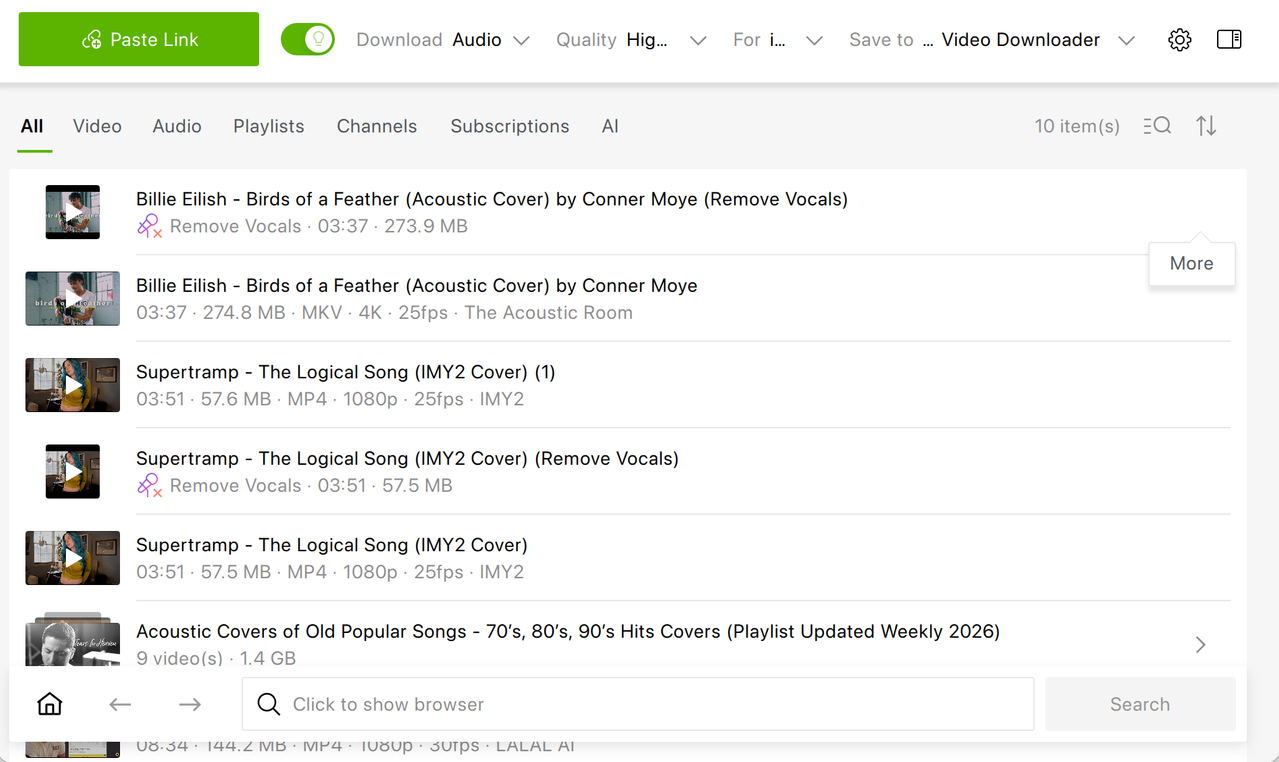
Wait for the download to complete. The file appears in your downloads list.
Click the "Media Tools" button next to the downloaded file.
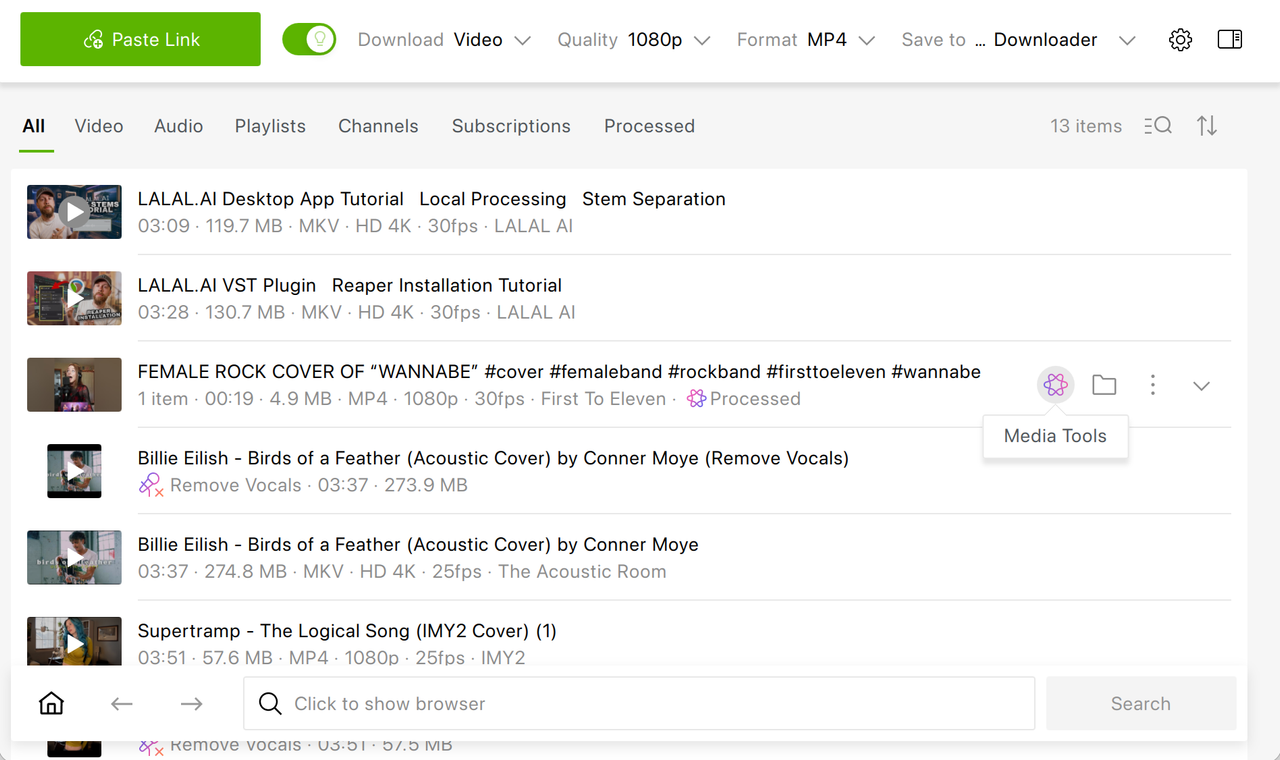
Select "Remove Vocals" from the menu.
Wait for processing to finish. The time depends on hardware: GPU-equipped machines run significantly faster than CPU-only systems.
Find the output file in the main downloads list and in the dedicated "Processed" list. Play or export it from there.
The entire process requires no audio editing knowledge and no separate software. 4K Video Downloader Plus also supports SoundCloud, Dailymotion, Twitch, Bilibili, Rumble, BitChute, Vimeo, and many other platforms, so the same workflow applies to music videos beyond YouTube.
Hardware and Performance NotesAudio processing is computationally intensive. By default, 4K Video Downloader Plus runs processing on the CPU across all supported operating systems. On compatible systems, GPU acceleration activates automatically and delivers faster results. NVIDIA and AMD GPUs with hardware acceleration support are recommended for smoother performance. Users on older machines or systems without a dedicated GPU will experience longer processing times.
If processing fails despite meeting system requirements, generate a DxDiag report on Windows (or an equivalent diagnostic report on other operating systems) and contact support at support@4kdownload.com.
Alternative Methods: Other Tools for Creating Karaoke TracksSeveral other tools can handle vocal removal, with different trade-offs in workflow, cost, and output quality. All of them require obtaining the audio file separately before processing, which is an additional step compared to 4K Video Downloader Plus.
LALAL.AI: Best Separation Quality for Professional UseLALAL.AI is available as a web tool, mobile app, desktop app, API, and VST. It’s a stem separation platform that uses proprietary neural network models, including the Andromeda engine released in late 2025. It separates vocals, instrumentals, drums, bass, piano, electric guitar, acoustic guitar, synthesizer, strings, and wind instruments, so it’s the widest stem set available in the category.
LALAL.AI is subscription-based, which can be rather pricey for enthusiasts. Plus, it doesn’t download YouTube content directly, so users must obtain the audio file first.
Moises: Best for Practicing MusiciansMoises is a subscription-based tool with native iOS and Android apps, chord detection, pitch control, and tempo adjustment layered on top of stem separation. It suits musicians who need features beyond simple vocal removal, slowing a track for practice, transposing to a different key. According to the Meta benchmark report of late 2025, separation quality is generally considered slightly below LALAL.AI but sufficient for karaoke use. It doesn’t download YouTube content directly.
VocalRemover.org: Free, Browser-Based, No InstallationVocalRemover.org is a free browser-based tool with no installation required. It’s suited to occasional, casual use. Quality is lower than paid alternatives, and there are file size limits. Audio must be downloaded separately before uploading.
Ultimate Vocal Remover 5 (UVR5): Free Desktop App for Technical UsersUVR5 is a free, open-source desktop application for Windows, macOS, and Linux. It supports multiple AI models including MDX-Net and Demucs. It offers strong quality at no cost but requires more setup than consumer tools and is best suited to tech-savvy users comfortable with desktop audio software. You can get UVR from GitHub.
Spleeter: Open-Source, Developer-OrientedSpleeter is Deezer's open-source stem separation library, the foundation on which many commercial tools are built. It’s free and powerful but operates via command line, making it accessible primarily to developers and technically proficient users.
Tools Compared| Tool | Downloads from YouTube | Vocal removal built-in | Requires separate upload | Cost | Platform |
|---|---|---|---|---|---|
| 4K Video Downloader Plus | ✔ | ✔ | ✖ | Free tier; paid license | Windows, macOS, Ubuntu |
| LALAL.AI | ✖ | ✔ | ✔ | Subscription from $7.5/mo (billed annually). Free preview & 10 minutes | Web / API / VST / desktop / mobile |
| Moises | ✖ | ✔ | ✔ | From $39/year | Web, iOS, Android, desktop |
| VocalRemover.org | ✖ | ✔ | ✔ | Free | Web |
| UVR5 | ✖ | ✔ | ✔ | Free | Desktop |
| Spleeter | ✖ | ✔ | ✔ | Free | CLI |
The key differentiator of 4K Video Downloader Plus is that it integrates both steps (downloading and vocal removal) into a single interface. Every other tool in the category requires obtaining the audio file separately before processing.
What to Expect from AI Vocal Removal QualityAI vocal removal tools currently achieve 85–98% accuracy depending on the source material. Quality is highest on modern pop, hip-hop, and electronic tracks with clearly separated vocal and instrumental frequencies. Tracks with heavy vocal reverb, close harmonics, or complex layering, like certain jazz recordings, choir arrangements, or heavily produced records, may show more bleed: traces of the original vocal or loss of instrumental detail in the output.
The technology is improving rapidly. LALAL.AI's Andromeda model, built on transformer architecture similar to large language models, showed up to a 10% improvement in SDR (Signal-to-Distortion Ratio) over previous model on benchmark datasets, an improvement that is reflected across the category as competing tools update their underlying models.
Is it legal to download a YouTube video and create a karaoke version for personal use?Downloading YouTube content may conflict with YouTube's Terms of Service depending on the content and use. Personal, non-commercial use of content you have rights to (or that is licensed for download) is the safest context. Always check the rights status of specific content before distributing a karaoke version publicly.
Can I download just the audio from YouTube instead of the full video?Yes. 4K Video Downloader Plus allows you to select audio-only formats (such as MP3 or M4A) when downloading. For the same purpose, you can also use 4K YouTube to MP3.
How long does vocal removal take?Processing time depends on track length and hardware. On a modern computer with a compatible GPU, a standard 3–5 minute song typically processes in under a minute. CPU-only processing on older hardware takes longer and varies by system.
Will the karaoke track include lyrics displayed on screen?No. Vocal removal strips the audio vocal track, it does not add on-screen lyrics. For lyrics display, you would need a separate karaoke player or software that supports LRC or CDG lyric files.
Does 4K Video Downloader Plus support platforms other than YouTube?Yes. The app supports YouTube, SoundCloud, Dailymotion, Twitch, Bilibili, Rumble, BitChute, Vimeo, and many other platforms. The same download-then-process workflow applies to any supported source.
Can I use a karaoke track created this way for a public performance or streaming?No, not without clearing the underlying music rights. Instrumental versions created by AI vocal removal are derivative works. Public performance and broadcast require licensing from the rights holders of the original composition and recording.
What if audio processing fails or produces errors?If processing fails despite meeting system requirements, 4K Download recommends generating a DxDiag report (Windows) or equivalent diagnostic report on other operating systems and contacting support at support@4kdownload.com.
What audio quality can I expect from the karaoke track?AI vocal removal tools currently achieve 85–95% accuracy depending on the source material. For karaoke purposes, such as home use, singing practice, teaching, and informal performance, the quality is generally sufficient. The instrumental backing track will carry the music clearly, and a live vocal naturally covers minor residual artifacts.
Key TakeawaysCreating a karaoke track from a YouTube video requires two steps: downloading the audio and removing the vocals. 4K Video Downloader Plus handles both inside a single app, making it the most efficient option for users who don't want to manage two separate tools. The built-in "Remove Vocals" AI processes a standard 3–5 minute song in under a minute on GPU-equipped hardware, and the output file appears automatically in the app's downloads list. For users who need higher-precision stem separation for professional work, LALAL.AI offers the strongest vocal extraction quality in the category. For musicians who want pitch and tempo controls alongside vocal removal, Moises is the better fit. For casual one-off use with no software to install, VocalRemover.org and similar browser tools get the job done at no cost. Whichever tool you use, remember that AI-generated karaoke tracks are derivative works, so public performance or redistribution requires clearing the underlying music rights.
| # | Наименование новости | Тональность | Информативность | Дата публикации |
|---|---|---|---|---|
| 1 | How to Download YouTube Videos in Multiple Languages: 2026 Guide | 0 | 25.27 | 09-09-2026 |
| 2 | What Is the Best YouTube Subtitle Downloader in 2026? Best Tools Compared | 0 | 9.52 | 24-09-2026 |
| 3 | SoundCloud Blocked in Your Region? Here's How to Fix It | 0 | 21.86 | 26-08-2026 |
| 4 | How to Download a YouTube Live Stream After It Ends | 0 | 22.29 | 29-06-2026 |
| 5 | 4K Video Downloader Plus vs. Downie: Which Is the Best YouTube Downloader for Mac in 2026? | 0 | 6.86 | 22-09-2026 |
| 6 | YouTube Video Quality Explained: Resolutions, Codecs, Bitrates, and How to Save Videos at the Quality You Want | 0 | 15.74 | 15-09-2026 |
| 7 | 4K Download World Cup Sale: 25% Off the 4K PRO Bundle Through July 21 | 0 | 20.22 | 23-06-2026 |
| 8 | Best AI Video Clipping Tools for Content Repurposing: Ultimate 2026 Selection | 0 | 23.44 | 14-07-2026 |
| 9 | Meet 4K Video Downloader Plus 26.2.0: Smarter Subscriptions, Tidier AI Results & More Updates | 0 | 21 | 07-07-2026 |